Making Tax Digital for VAT: How Your Figures Actually Reach HMRC
Under Making Tax Digital, you can't type your VAT Return into HMRC. Which boxes you fill, a worked quarter, and the routes that keep your figures compliant.
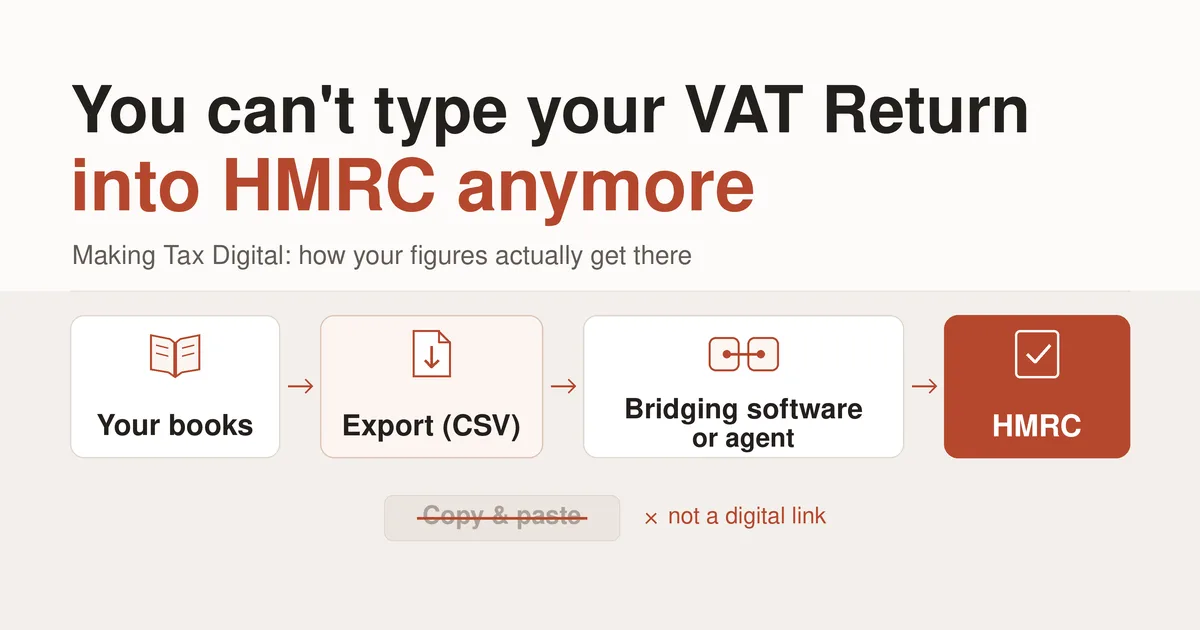
If you're registered for VAT in the UK, you almost certainly can't type your VAT Return into HMRC's website anymore. Under Making Tax Digital, you keep your VAT records in software and submit the return through software that connects to HMRC. Between those two points, the figures have to travel by what HMRC calls a digital link: an export, an import, a linked spreadsheet cell. Copying and pasting them, or reading them off one screen and typing them into another, isn't one.
That last rule is the one small businesses most often break without realizing it. This guide covers what Making Tax Digital actually asks of you, the five VAT Return boxes most businesses fill in, a real quarter worked through to the pound, the routes that legitimately get those figures to HMRC, and what happens if you're late.
What Making Tax Digital actually requires
Since April 2022, Making Tax Digital for VAT applies to every VAT-registered business, whatever its turnover, including businesses that registered voluntarily. A small number can apply to HMRC for an exemption, for example because age, disability or location makes using software impractical. For everyone else, there are three requirements, and they work together.
Digital records. The records behind your VAT Return live in software, not on paper: your business details, the VAT accounting scheme you use, and for each sale and purchase the date, the value and the rate of VAT.
Digital links. Once a figure is in your software, any move to another program has to happen digitally. HMRC's VAT Notice 700/22 lists what counts, including linked spreadsheet cells, automated transfers, and importing or exporting files such as CSV. It's just as clear about what doesn't: cut and paste, copy and paste, or retyping a figure by hand.
Compatible software that submits. The return goes to HMRC through software that uses HMRC's Making Tax Digital connection. That can be your bookkeeping software, or a separate tool called bridging software that takes figures from elsewhere and submits them for you.
The nine boxes, and the five most businesses fill
The VAT Return has nine boxes. For most businesses in Great Britain, five of them do the work.
Box 1: VAT due on sales. The VAT you charged customers in the period.
Box 4: VAT reclaimed on purchases. The VAT you paid on business costs and are entitled to reclaim, backed by valid VAT invoices.
Box 5: Net VAT. The difference between Box 3 and Box 4: what you pay HMRC, or what HMRC repays you.
Box 6: Total sales excluding VAT. The value of all your sales, including zero-rated and exempt ones, without the VAT.
Box 7: Total purchases excluding VAT. The value of your business purchases, without the VAT.
The other four rarely move for a business in Great Britain. Box 3 is the total VAT due, Box 1 plus Box 2. Boxes 2, 8 and 9 cover trade in goods between Northern Ireland and the EU, so they're usually zero, which means Box 3 simply equals Box 1.
One quarter, worked through
Take a graphic designer in Leeds over July to September. She invoices £24,000 of work in the quarter, all at the standard 20% rate, so she charges £4,800 of VAT. She spends £6,000 on a laptop and monitor, a year's design software and a brochure print run, all from VAT-registered suppliers with proper VAT invoices, and pays £1,200 of VAT on them.
Her return reads:
Box 1: £4,800 Box 3: £4,800 Box 4: £1,200 Box 5: £3,600 Box 6: £24,000 Box 7: £6,000
She owes HMRC £3,600 for the quarter.
On the standard scheme, those figures follow the dates on her invoices and bills, not the dates money moved. If a client hasn't paid by 30 September, the VAT on that invoice is still in Box 1, and she pays it to HMRC before her client has paid her. That's the trade-off the cash accounting scheme exists for: businesses with VAT taxable turnover up to £1.35 million can join it and account for VAT only when money actually changes hands, which changes the figures accordingly.
Three ways your figures can reach HMRC
Software that submits directly. Your bookkeeping software calculates the return and sends it to HMRC itself. Everything stays in one place, so there's no link to worry about.
Bridging software. Your figures are prepared in one place and submitted from another. The connection between them has to be digital: a spreadsheet with linked cells, or a file exported from your records and imported into the bridging tool. This route suits businesses whose bookkeeping software doesn't submit returns itself.
An agent. Your accountant or bookkeeper submits on your behalf through their own Making Tax Digital software. Giving them your records digitally, for example as an exported file they import, keeps the chain intact.
The step that quietly breaks the rules is the manual one in the middle. Opening a report, reading Box 1 and typing it into a bridging tool feels harmless, and it's exactly what HMRC says isn't a digital link. The same goes for handing your accountant a printout or a PDF that they retype. If there's a copy, paste or retype anywhere between your records and the submission, that's the step to replace with an export and import.
When it's due, and what late costs
Your VAT Return and your payment are both due one calendar month and seven days after the end of the VAT period. For a quarter ending 30 September, that's 7 November. If you pay by Direct Debit, HMRC collects three working days after that date. Businesses on the annual accounting scheme file one return a year, due two months after the year ends. Your exact periods and due dates are shown in your HMRC online account, and those are the ones that count.
Late returns and late payments are penalised separately.
Late returns earn penalty points. Each late return adds a point. Quarterly filers who reach four points get a £200 penalty, and another £200 for every late return after that until the points are cleared by a run of on-time filing.
Late payments cost a percentage. Pay within 15 days of the due date and there's no penalty, though interest runs from the first day. After 15 days there's a penalty of 3% of what's still unpaid, a further 3% if it's still unpaid after 30 days, and then a daily charge at 10% a year. If you can't pay in full, agreeing a Time to Pay arrangement with HMRC early stops the penalties, though interest continues.
How Papertools fits in
Papertools keeps real double-entry books. When your workspace's country is the United Kingdom, the Tax summary report computes your VAT Return figures in the return's own labels: Box 1, Box 4, Box 5, Box 6 and Box 7, built from the invoices, bills and expenses you've recorded. Two questions in Settings → Tax, How often you file and the months your periods end in, set the quarters, so the period on screen is the period you're about to submit.
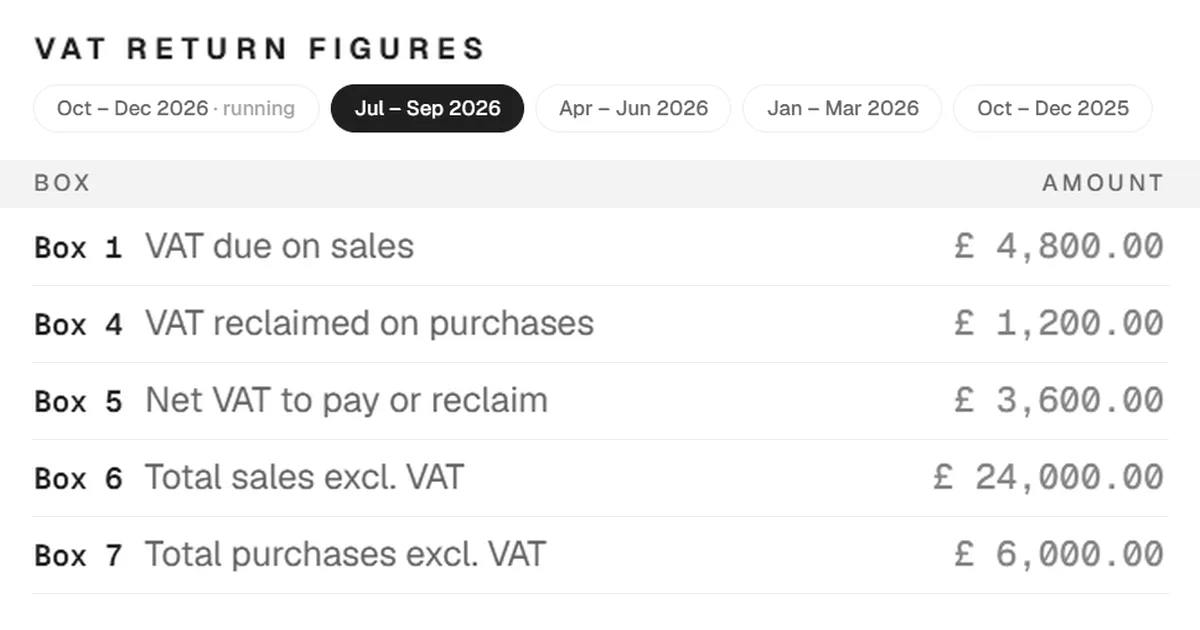
Papertools doesn't submit to HMRC. It prepares the figures and leaves the route to you. Export them as a CSV and import that into your bridging software, or send the CSV to your agent to import into theirs. The export is the digital link, so the chain from your records to HMRC stays unbroken. The same screen produces a PDF, which is for reading, keeping and reviewing, not for retyping.
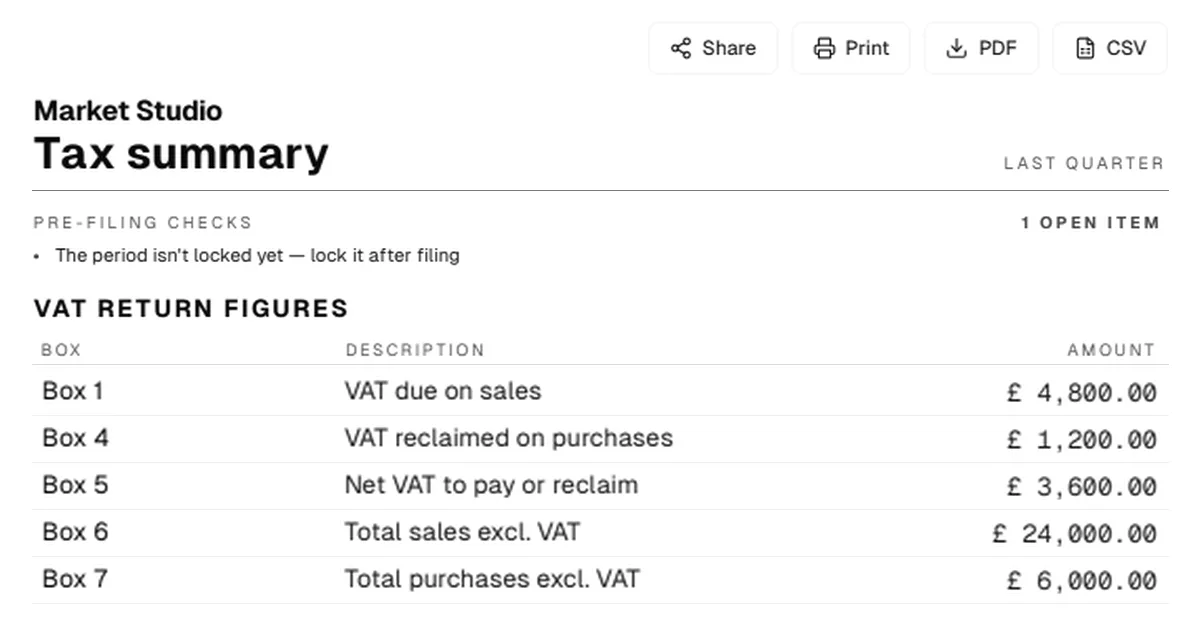
Before you export, the report runs pre-filing checks and flags anything in the period that would make the figures incomplete: draft invoices and bills, expenses waiting for approval, and bank lines with no record behind them. Each one links straight to the fix. After you've submitted, it prompts you to lock the period, so nothing can change underneath a return you've already filed. And Paper-Ai, the assistant built into Papertools, knows the return by name, so you can ask how your VAT Return is looking and get an answer from your own figures.
Two settings in Settings → Tax matter here. We're registered to charge tax should be on, and for most VAT-registered businesses, so should We can claim back the tax our vendors charge us. The Help Center guide to the Tax summary walks through the rest of the report.
What this won't fix
Papertools doesn't submit your return to HMRC. You'll still need bridging software or an agent to make the submission.
The figures are invoice-dated, which matches the standard scheme. If you're on the cash accounting scheme, they won't match what you report. On the Flat Rate Scheme, Box 1 is a fixed percentage of your VAT-inclusive turnover rather than the VAT on your invoices, so the computed figures won't apply either.
Boxes 2, 8 and 9 aren't computed. If you move goods between Northern Ireland and the EU, those boxes need working out separately. The same goes for anything that changes where VAT lands on the return, such as reverse-charge purchases of services from abroad or postponed import VAT: check those against your own records before you submit.
And the figures are only as good as the records behind them. A purchase recorded without its VAT, or a VAT invoice missing required details, affects Box 4 directly. What a valid invoice needs to carry is covered in How to Write an Invoice. When a treatment is genuinely unclear, that's a question for HMRC or your accountant, not your software.
Quick answers
Can I still submit my VAT Return on HMRC's website? Not if Making Tax Digital applies to you, which it does for almost every VAT-registered business. Only businesses HMRC has granted an exemption can still file without compatible software.
Is copying figures from a report into bridging software allowed? No. Copy and paste, and retyping, are exactly what HMRC says isn't a digital link. Export a file and import it instead.
Does exporting a CSV count as a digital link? Yes. VAT Notice 700/22 lists importing and exporting files, including CSV, as a digital link.
I registered for VAT voluntarily. Does Making Tax Digital still apply? Yes. Since April 2022 it applies to every VAT-registered business, whatever its turnover.
Can my accountant submit for me? Yes. An agent can submit through their own Making Tax Digital software, as long as your figures reach them digitally.
Where to go next
- Accounting software for the United Kingdom — how Papertools handles UK VAT periods, boxes and the submission route
- The Tax summary guide — the step-by-step guide to the report, its periods and its checks
- How to Write an Invoice — what a valid invoice needs to carry
- VAT Notice 700/22: Making Tax Digital for VAT — HMRC's official rules on digital records and digital links
- Simpler BAS Explained — the same idea for Australian GST: what goes in G1, 1A and 1B
This article is general information about how tax rules work, not tax, accounting or legal advice. Rules and thresholds change, and how they apply depends on your business. Check the official guidance linked above, or speak to a qualified adviser, before acting on anything here. Papertools gives you the figures; the decisions and the filing stay with you.