AI for Small Business Bookkeeping: What It Does Well (and Where It Goes Wrong)
Can AI do your bookkeeping? What AI really does well for small businesses, where it goes wrong, and the simple rule that keeps your books safe.
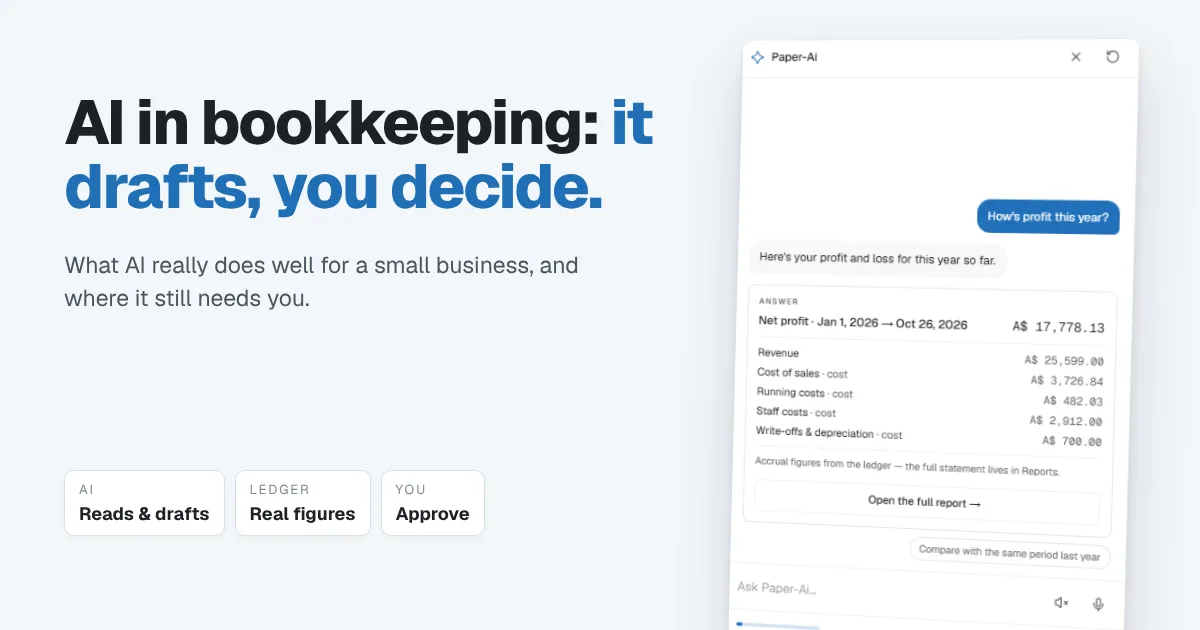
Depending on who you listen to, AI is either about to do your bookkeeping for you or it's an overhyped add-on you can ignore. Ask small business owners who actually use it, and you get a much more useful answer: AI saves real time on the tedious parts, but it still needs a person checking the work. The businesses that get burned are the ones that let it run unsupervised.
This guide covers what AI is genuinely good at in small business bookkeeping, where it goes wrong, and the simple rule that lets you use it without risking your books.
The short answer: AI is good at reading documents, drafting invoices and entries, and answering questions about your numbers in plain language. It's not good at judgement calls, and it can quietly repeat a mistake for months if nobody checks. Use it as a fast assistant that drafts while you review and approve. Never let it post to your books on its own.
What AI is genuinely good at
For a small business, the useful AI isn't the futuristic kind. It's the kind that removes typing and searching:
- Reading documents. Pulling the date, supplier, amount and tax from a receipt, bill or bank statement, so you're not retyping it.
- Drafting. Turning "invoice Summit for the service call, $120 plus two breakers" into a draft invoice with the right customer and items.
- Answering questions in plain words. "Who owes me the most?" "How's profit this year?" "How late is the money owed to us?" Questions that used to mean opening three reports and doing the maths.
- Suggesting categories. Proposing where a transaction belongs based on what you did last time.
- Spotting what needs attention. Overdue invoices, unmatched bank lines, bills about to fall due.
Every one of those saves minutes, and across a month that's hours. None of them needs the AI to make a final decision.
Where AI goes wrong
The problems show up in predictable places:
- Confident mistakes. AI doesn't hesitate when it's wrong. A miscategorised expense looks just as tidy as a correct one.
- Errors that repeat silently. If a rule or suggestion is wrong once and nobody notices, it can misfile the same supplier every week for months, and you only find out at tax time.
- Messy records. Loose input can create a second "Summit Property" next to "Summit Property Services", and your customer list slowly fills with duplicates.
- Made-up numbers. A general AI chatbot asked "what was my profit?" may produce a plausible-sounding figure that isn't based on your books at all.
- Judgement it can't make. Whether a purchase is a business expense, how a deposit is taxed, or whether an old invoice should be written off depends on facts and rules the AI doesn't know.
The rule that keeps AI safe: it drafts, you decide
The safest setup is simple: AI can read and draft, but only a person can save. Everything it produces lands as a draft or a suggestion, and nothing reaches your books until you've looked at it.
| Task | AI's job | Your job |
|---|---|---|
| A new invoice | Draft it from a sentence | Check the lines, then save and send |
| A receipt or bill | Read the details | Confirm the category and amount |
| A bank line | Suggest a match | Approve it, or pick the right one |
| "How's profit?" | Answer from your ledger | Decide what to do about it |
| An unusual transaction | Flag it | Make the call, or ask your accountant |
Done this way, AI takes away the typing and the searching, and you keep the decisions. You also catch its mistakes the first time, not six months later.
Five questions to ask before trusting an AI bookkeeping tool
| Question | Why it matters | A good answer |
|---|---|---|
| Does it save anything without you? | Unreviewed entries are how errors pile up | No, everything is a draft until you confirm |
| Where do its numbers come from? | General chatbots can invent figures | Calculated from your own ledger |
| Does it only use your own records? | Stops it inventing customers, items or tax rates | It picks from your existing lists |
| What happens to your data? | It's your financial information | Clear terms, and not used to train the AI |
| Can you switch it off? | You should stay in control | Yes, for the whole business |
How Papertools uses AI
Papertools has an assistant called Paper-Ai, built around exactly that rule. The panel says it plainly: "Your workspace assistant — ask away. Nothing is saved without you."
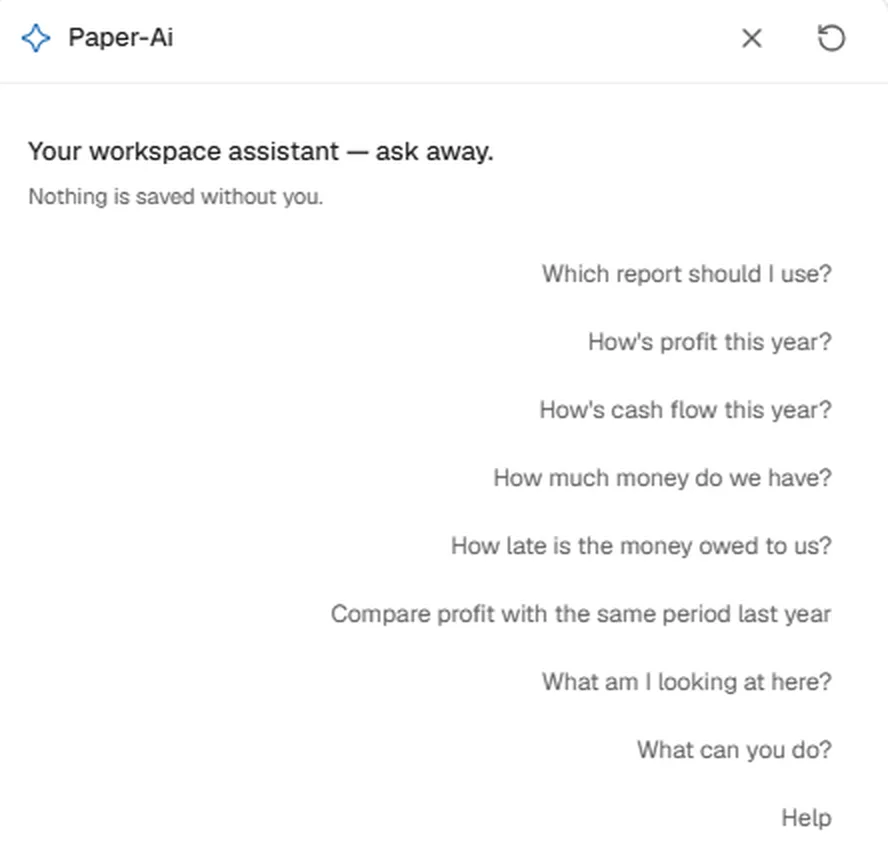
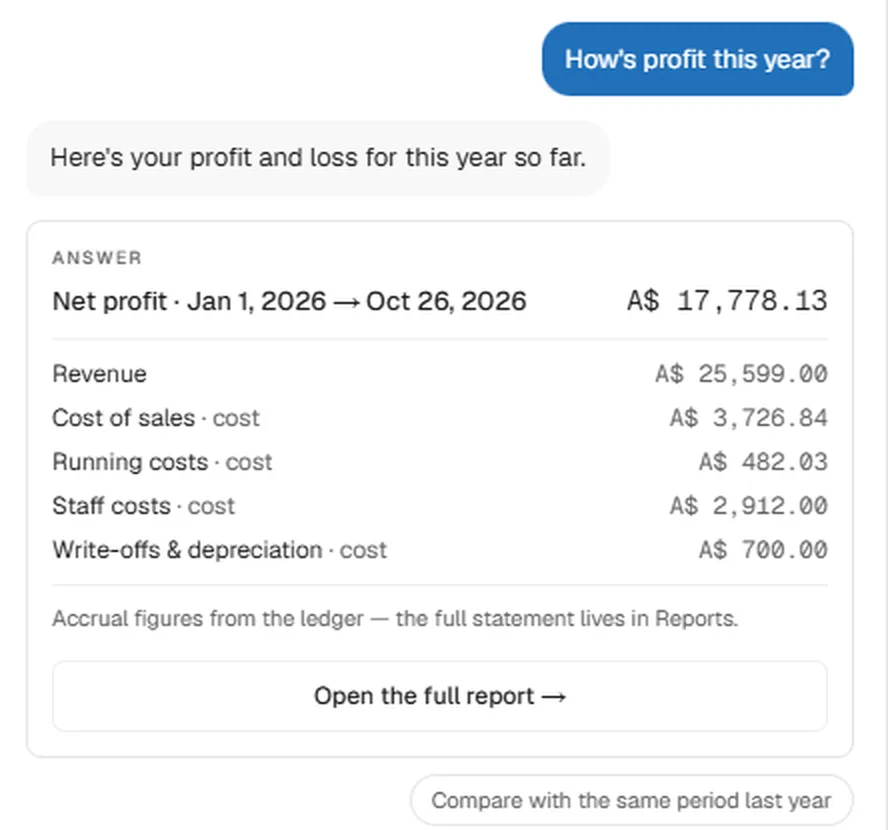
It knows which screen you're on and suggests questions to match. On Reports you'll see "How's profit this year?", "How late is the money owed to us?" and "Compare profit with the same period last year". Ask one, by typing or by voice, and the answer comes straight from your books, with the breakdown underneath and a link to the full report.
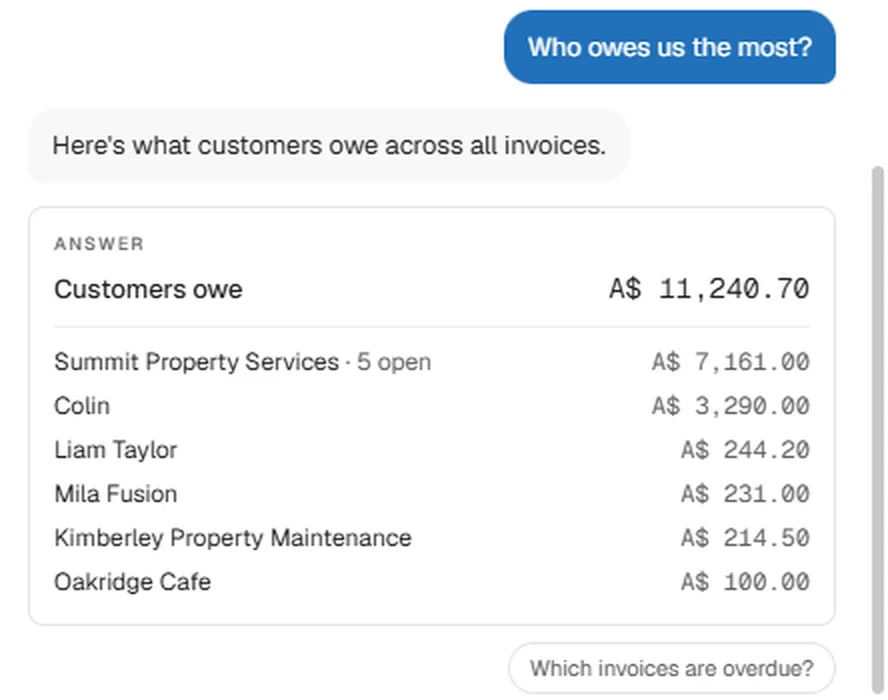
It's just as quick on money owed. Ask "Who owes us the most?" and you get every customer's open balance, largest first, with a follow-up question ready to tap.
It also works with you on the page you're on. Ask it to draft an invoice or an estimate from a single sentence, or to explain what you're looking at, and it uses your own customers, items and tax rates rather than inventing new ones. The draft waits for you to review it and press Save. It only works with your workspace, it doesn't answer questions about anything else, and the owner can switch it off for everyone. Paper-Ai is built on Anthropic's Claude, and what you ask it isn't used to train the AI.
The same principle runs through the rest of Papertools. Bank statement imports suggest matches, but you approve them, and every entry stays visible in your books, so nothing happens behind your back.
Paper-Ai is included on every plan, including the free Essential plan, with a monthly allowance that grows on paid plans. See the pricing page for details.
You can start free with Papertools, with no credit card.
What AI won't fix
- Records that were never kept. AI can read what exists. It can't recover a receipt you never kept or a sale you never recorded.
- Your tax decisions. What's deductible, how deposits are taxed and when to register for GST, VAT or sales tax are questions for your accountant.
- A habit of never checking. A weekly ten-minute review is still what keeps books clean, with or without AI.
- Mixed personal and business spending. Keep them in separate accounts. AI can't tell what you meant.
Quick answers
Can AI do my bookkeeping for me? Not on its own. It can read documents, draft invoices and entries, and answer questions about your numbers, but a person still needs to review and approve what goes into the books.
Is AI bookkeeping accurate? It's accurate when it reads from your own ledger and a person checks its suggestions. It's risky when it posts entries unreviewed, or when a general chatbot guesses figures that aren't based on your records.
Will AI replace bookkeepers and accountants? It's replacing typing and searching, not judgement. Small businesses still need someone to make the calls on tax, unusual transactions and year-end, whether that's you or your accountant.
Is it safe to use AI with my financial data? Check what the tool does with your data, whether it's used for training, and whether the AI can change anything without your approval. Choose tools that answer all three clearly.
What's the best way to start using AI in bookkeeping? Start with questions: ask about overdue invoices, profit or cash. Then let it draft invoices for you to review. Leave automatic posting off.
Does Paper-Ai cost extra in Papertools? No. It's included on every plan, including the free plan, with a monthly allowance.
Where to go next
- Proper Books Without Becoming a Bookkeeper — why the books underneath still matter
- How to Read an Aging Report — the report behind "who owes us the most?"
- What a Free Accounting Plan Should Include (and When It's a Dead End) — what you get without paying
- How to Track Partial Payments Across Multiple Projects (and Send One Statement) — keeping balances right when payments come in pieces
This article is general information about how bookkeeping works, not tax, accounting or legal advice. Rules differ by country and business. Check with a qualified adviser before acting on anything here. Papertools gives you the figures; the decisions stay with you.