How to Track Partial Payments Across Multiple Projects (and Send One Statement)
One client, several projects, random partial payments? Learn how to apply each payment to the right invoice and show the full history in one statement.
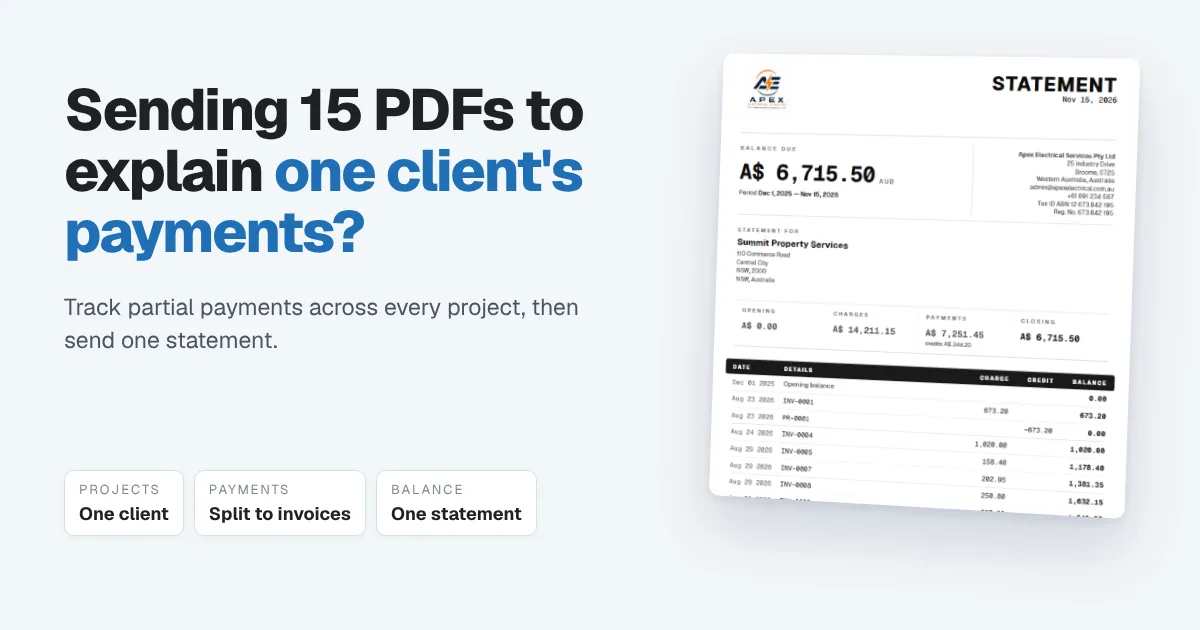
One client gives you five projects. Each is worth $2,000. Instead of paying each invoice, they send money whenever it suits them: $1,500 one week, $800 the next, a round $2,500 a month later, with a message that says "adjust it against what's due." Then one day they ask how much they've paid so far, and you end up sending fifteen PDFs into a chat thread to prove it.
This is one of the most common headaches for freelancers and small agencies, and it isn't really an invoicing problem. It's a tracking problem. The fix is simple: record every payment against the invoices it actually covers, and when the client asks, send one statement instead of a pile of documents.
The short answer: keep each project as its own invoice (or set of invoices) under one customer. When money arrives, record it once and split it across the invoices it pays, oldest first unless the client says otherwise. Track anything you pay other freelancers against the same projects. When the client asks what they've paid, send a customer statement: every invoice, every payment and the balance, on one page.
Why random partial payments get messy
Partial payments from one client across several projects create the same problems every time:
- Nobody agrees which invoice was paid. The client thinks the $2,500 cleared project 2. You applied it to project 1. Both of you are working from different numbers.
- Balances live in chat history. The only record of what's been paid is scattered across messages, screenshots and bank alerts.
- Each invoice looks "partly paid" forever. Without a running total, it's hard to see what's genuinely outstanding and what's simply been paid in pieces.
- Your own costs disappear. If you pay another freelancer to help on a project, that cost often sits in a separate spreadsheet, so you never see what each project actually earned you.
- Proving it takes hours. When the client asks, you rebuild the history by hand.
Set it up so every payment has a place
1. One customer, several projects. Keep the client as one customer record, and give each piece of work its own project or its own invoice. That's what lets you see both views: everything the client owes overall, and where each project stands.
2. Invoice each project separately. Even when the client pays in round amounts, separate invoices make it obvious which work has been paid for. Ongoing maintenance gets its own invoice too, so it doesn't blur into project fees.
3. Agree how payments are applied. Say it once, in writing: "Unless you tell us otherwise, payments go against the oldest unpaid invoice first." That one sentence settles most disputes before they start.
4. Record each payment the day it lands. Enter the amount, the date and which invoices it covers. If one payment covers two invoices, split it. If it only covers part of one, record it as a part payment and the rest stays open.
5. Track what you pay others against the same project. When you hire a freelancer or buy something for a client's project, record it as a bill or expense tagged to that project. Then you can see what each project really made, not just what it billed.
6. Send a statement, not a pile of invoices. A customer statement lists every invoice, payment and credit in date order, with a running balance. It answers "how much have I paid?" in one page.
A worked example
A freelance web developer has one client with five projects, each invoiced at $2,000. Over two months, the client sends four payments.
| Payment | Amount | Applied to | Balance after |
|---|---|---|---|
| Opening: 5 invoices raised | $10,000 | ||
| Payment 1 | $1,500 | Project 1 (part) | $8,500 |
| Payment 2 | $2,500 | Project 1 ($500, now paid) and Project 2 ($2,000, paid) | $6,000 |
| Payment 3 | $800 | Project 3 (part) | $5,200 |
| Payment 4 | $1,200 | Project 3 ($1,200, now paid) | $4,000 |
Total paid: $6,000. Projects 1, 2 and 3 are paid in full. Projects 4 and 5 are still open, at $4,000.
When the client asks what they've paid, one statement shows exactly that: five invoices, four payments, and $4,000 left to pay. Meanwhile the developer paid a designer $600 to help on Project 2, recorded against that project, so Project 2 shows $2,000 billed, $600 in costs and $1,400 earned.
How Papertools handles partial payments across projects
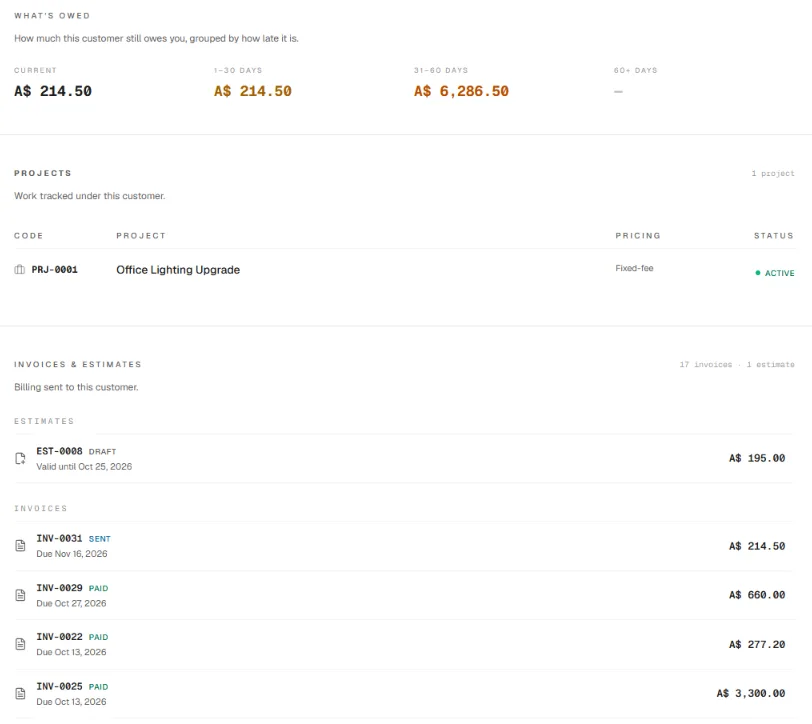
In Papertools, a client is one customer, and their page shows everything at once: what they owe right now, grouped by how late it is, the projects you're tracking for them, every invoice and estimate, and every payment received. One click on View statement opens their statement.
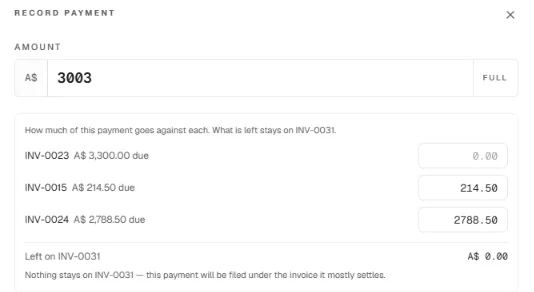
When a payment arrives, open any of that customer's unpaid invoices and choose Record payment. Enter the amount you received, and Papertools lists their other open invoices so you can say how much goes against each one. Whatever isn't allocated elsewhere stays on the invoice you opened. If nothing's left on it, Papertools files the payment under the invoice it mostly settles. Choose the account it was paid into, the method and the date, add the bank reference, and optionally email the customer a receipt.
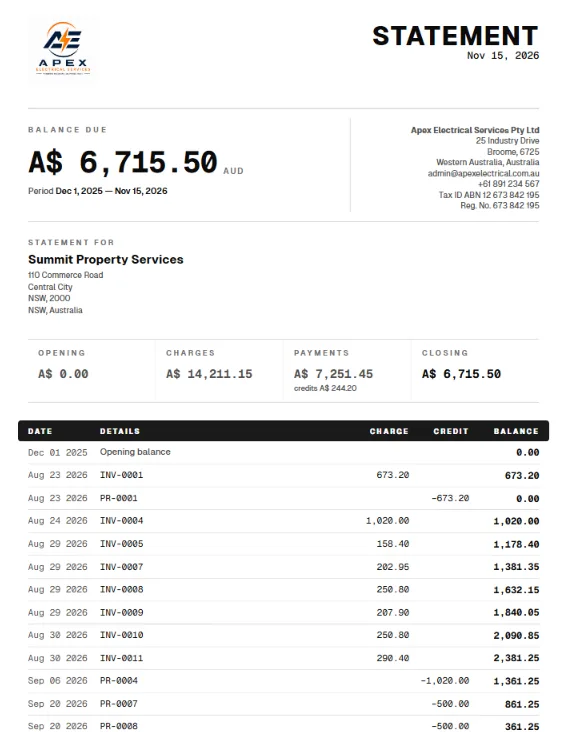
The customer statement lists every invoice, payment and credit note in date order, with a running balance, for the period you choose. It opens with a summary of the opening balance, charges, payments and closing balance, and prints your payment details at the bottom. Download it as a PDF or share it straight to the client. That's the one document that replaces fifteen.
Your side of the work is tracked the same way. Tag a bill or expense from another freelancer to the project, and the per-project profit and loss report shows each project's revenue, costs and margin, along with its cost budget if you've set one.
Customer statements, recording and splitting payments, projects and per-project profit are all on the free Essential plan, and you can send statements to customers one at a time on every plan. Sending statements to all your customers at once, and invoicing in more than one currency, are part of the Business plan and above. See the pricing page for the full comparison.
You can start free with Papertools, with no credit card.
What this won't fix
- A client who won't say what a payment is for. Agree a default rule, oldest invoice first, and put it in writing.
- Work that was never invoiced. A statement only shows what's been billed. If work was done and not invoiced, raise the invoice first.
- Exchange-rate differences. If clients pay in another currency, the amount that lands may differ from the invoice. Record what actually arrived, and check with your accountant how your country treats the difference.
- Late payers. Seeing the balance clearly helps. Getting it paid still takes follow-up and reminders.
Quick answers
How do I track partial payments from one client? Record each payment against the invoice or invoices it covers, on the day it arrives. A part payment leaves the rest of the invoice open, so the balance is always right.
Can one payment cover several invoices? Yes. Split the amount across the invoices it pays and record it once. Your books then show exactly which invoices are settled.
Which invoice should a partial payment go against? Whatever the client says it's for. If they don't say, the usual rule is the oldest unpaid invoice first. Agree that rule with them in writing.
What is a customer statement? A one-page summary of everything a customer has been invoiced, everything they've paid and the balance left, in date order. It's the quickest way to answer "how much have I paid?"
How do I show a client their payment history? Send a customer statement for the period they're asking about, instead of resending individual invoices and receipts.
Should I invoice each project separately? Usually, yes. Separate invoices make it clear which work has been paid for, even when the client pays in round amounts.
How do I record payments to freelancers I hire? As a bill or expense from that freelancer, tagged to the project they worked on. That keeps your income and costs separate and shows what each project really earned.
Where to go next
- A Client Paid Before the Invoice Was Ready: How to Record It — when the money arrives before the invoice
- How to Read an Aging Report — seeing which balances are getting late
- How to Get Clients to Pay Invoices on Time — habits that get invoices paid in full
- How to Track and Pay Supplier Bills Without a Spreadsheet (or Enterprise Software) — recording what you pay other people
- Record a manual or partial payment — the Help guide for recording payments
- Job costing: the small leaks eating your margin — seeing the real profit on each project
This article is general information about how bookkeeping works, not tax, accounting or legal advice. Rules differ by country and business. Check with a qualified adviser before acting on anything here. Papertools gives you the figures; the decisions stay with you.