Job Costing: The Small Leaks Eating Your Margin
The job looked profitable, so where did the money go? The three small leaks that eat a trade job's margin — supply runs, dashboard receipts and your own hours — with a worked example and a five-minute routine to stop them.
You quoted the job properly. Materials, labour, a fair margin. The customer paid on time. And yet, when the month ends, there's less money than all those "good jobs" should have left.
Most small trade and service businesses catch the big costs. The equipment, the main materials and the crew's hours are hard to miss. What quietly eats the margin is the small stuff that never gets written against the job: the extra trip to the supplier, the receipt that sat on the dashboard for two weeks, and the owner's own hours that nobody counted.
This guide covers the three leaks that make profitable-looking jobs pay far less than they seem, a worked example with real numbers, and a simple routine to catch them.
The short answer: Job costing means recording every cost against the job it belongs to, so you can see what each job really made. The big costs are easy. The leaks are the small ones: extra supply runs, receipts left in the van, and your own time left out of the maths. Tag every cost to the job at the moment you spend, log trips against the job, and divide the job's profit by the hours you actually worked. If the hourly figure is low, the job was underpriced, not "good".
What job costing actually tells you
Your profit and loss report tells you whether the business made money. It doesn't tell you which work made it.
Job costing does. For each job you see:
- What you charged: the quote, plus any extras you invoiced.
- What it cost: materials, labour, subcontractors, travel and the small stuff.
- What was left: the job's real profit, in dollars and as a margin.
Do that for a handful of jobs and patterns appear fast. Some types of work pay well. Others only look busy. Without it, every job feels profitable because the bank balance went up.
Leak 1: Supply runs that never get logged
You're halfway through and you're one fitting short. Off to the supplier: $18 for the part, 25 minutes each way, fuel, and the time you're not working.
That part often gets bought on a card and forgotten, or lumped into "general supplies" at the end of the month. The trip itself is almost never counted.
Two or three of those on one job can wipe out a sizeable share of the margin, and the job still looks fine on paper.
The fix: record the part against the job before you leave the supplier's car park, and log the trip too. A per-kilometre or per-mile rate turns the drive into a real number. Your accountant can tell you the standard rate where you are.
Leak 2: Receipts on the dashboard
The second leak is time-delayed. A receipt goes on the dash, then in the door pocket, then in a pile on the kitchen table. Two weeks later, nobody remembers which job the $96 of sealant and fixings was for.
So it gets recorded as a general expense, or not at all. Either way, it disappears from the job that caused it, and that job looks better than it was.
The fix: photograph the receipt at the counter and tag it to the job right then. Twenty seconds in the car park beats twenty minutes of guessing on Sunday night.
Leak 3: Your own hours
This is the biggest leak, and it's the one that hides best.
When staff work on a job, their wages are a cost and usually get counted. When the owner does the work, their time often doesn't appear anywhere. The job "made $1,180", but it took you fourteen hours. That's $84 an hour before you've paid yourself anything, covered your van, insurance and phone, or put a cent aside.
Some jobs that look great turn out to have paid the owner $12 an hour.
The fix: decide what your time is worth, a real hourly rate you'd pay someone to do your job, and include it when you quote. Then, when the job's done, divide the job's profit by the hours you actually put in. If the answer is below your rate, the job was underpriced.
A worked example
A small renovation job, quoted at $1,800 (before tax), with $620 of planned materials.
On paper: $1,800 − $620 = $1,180 profit. The owner expected about 14 hours on the job, so roughly $84 an hour.
What actually happened:
- Two extra supply runs: $64 of parts, plus 50 km of driving at $0.85/km = $106.50, and 1.5 extra hours.
- Receipts that sat on the dash: sealant, fixings and blades = $96.
- Owner's time: 14 hours planned, plus the 1.5 hours of supply runs = 15.5 hours.
Real profit: $1,800 − $620 − $106.50 − $96 = $977.50.
Real hourly rate: $977.50 ÷ 15.5 hours = about $63 an hour, a quarter less than the owner thought. And that's before the van, insurance, phone and tax.
None of those leaks was big. Together, they changed what the job was worth. If this job type happens twenty times a year, that's about $4,000 a year the owner never knew they were giving away.
How to track job costs without a spreadsheet
You don't need a separate job-costing system. You need every cost to land on the right job as it happens.
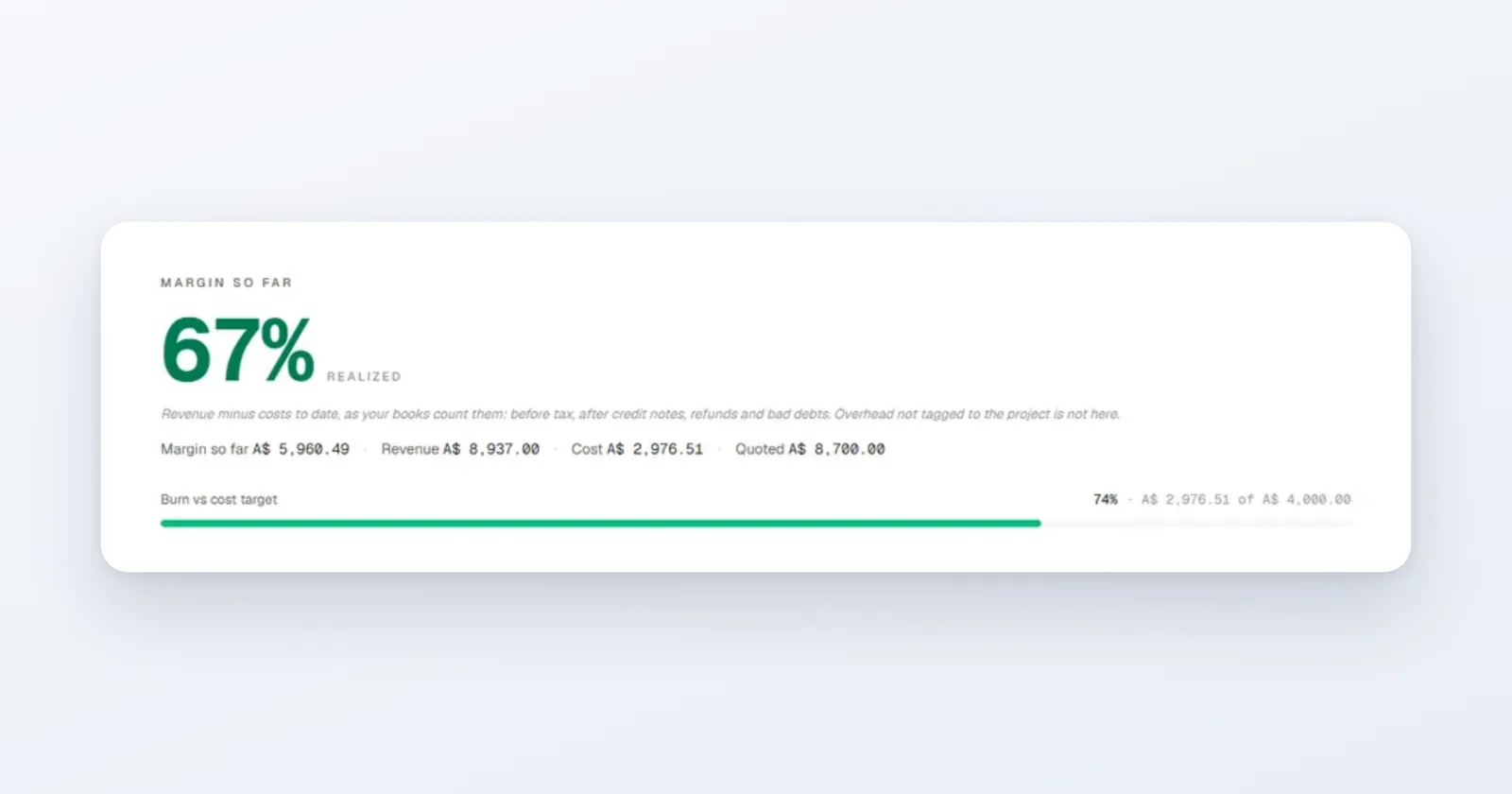
In Papertools, each job can be a project. You set the quoted price and a cost target, and every cost you tag to the project counts against it: bills, expenses and pay for staff who worked on it. The project then shows the margin so far, what you've spent against your cost target, and how much of that target you've burned through, while the job is still running.
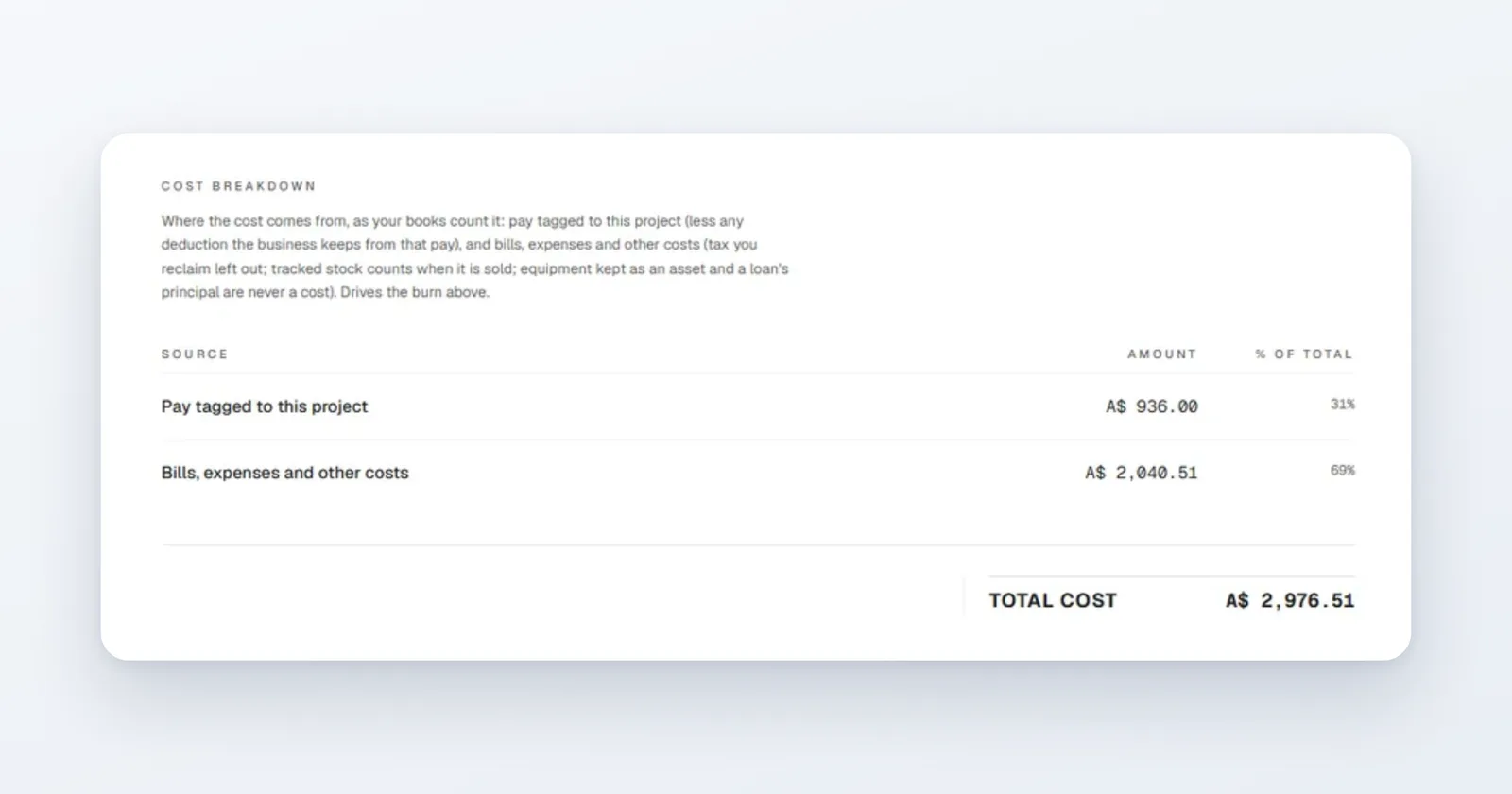
Open the cost breakdown and you can see where the money went, so you know whether it was labour or materials that pushed a job over.
To stop the three leaks:
- Supply runs: record the expense with the job selected, at the counter. Log the trip in the mileage log against the same project.
- Dashboard receipts: attach the photo of the receipt to the expense when you record it, so it never needs sorting later.
- Your hours: your own time isn't a cost in your books, so no software will count it for you. Keep a rough tally of hours per job and compare it with the project's margin. Use what you learn when you quote the next one.
Invoices for the job can be linked to the project too, so revenue and costs sit side by side. Project cost tracking is on the Papertools free plan.
A five-minute routine that catches the leaks
- At the counter: record the expense, tag the job, snap the receipt.
- After every trip: log the kilometres against the job.
- End of each day: write down the hours you spent on each job, even roughly.
- When the job finishes: check the project's margin and work out your real hourly rate.
- Once a month: compare a few finished jobs side by side. Which kind of work pays best? Price the next one accordingly.
Common questions
What is job costing in simple terms? Recording every cost against the job it belongs to, so you can see what each individual job really made. It's how you find out which work is profitable and which only keeps you busy.
Should I include my own time in job costing? Include it when you quote, and check it when the job's done. Your time usually isn't recorded as a cost in your books if you're the owner, so the job's profit is really your pay for those hours. Divide it by the hours you worked to see whether the job was worth it.
How do I account for travel in a job's cost? Log the distance against the job and multiply by a per-kilometre or per-mile rate. Many tax offices publish a standard rate. Your accountant can confirm the one that applies to you.
What's a good margin for a small trade job? It depends on your trade, your area and your overheads, so there's no single right number. Track your own jobs for a few months. Your best and worst job types will tell you far more than an industry average.
Can I track job costs on the Papertools free plan? Yes. Projects, expenses, bills and the per-project profit report are all available on the free plan. See the pricing page for what each plan includes.
Where to go next
- How to invoice from your phone on site — billing the job before you leave the driveway
- How to follow up on a quote — winning the work you've priced properly
- Tracking partial payments across multiple projects — keeping each job's money straight
- How to catch up on bookkeeping — if the receipts have already piled up
This article is general information about how bookkeeping works, not tax, accounting or legal advice. Rules differ by country and business. Check with a qualified adviser before acting on anything here. Papertools gives you the figures; the decisions stay with you.