What Your Accountant Needs Every Quarter and at Year End
What your accountant needs for each BAS, GST or VAT return and at year end, four checks before you send, and two ways to hand it over: one export file or direct access.
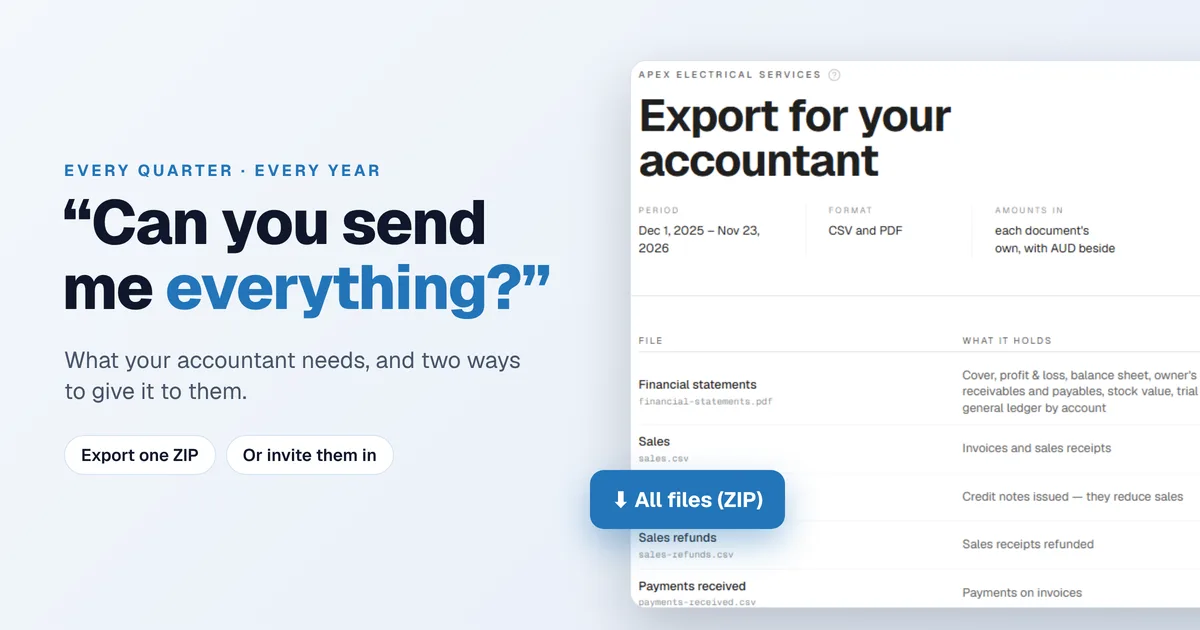
"Can you send me everything?"
If you run a small business, you get that message more than once a year. It arrives before every sales tax return (BAS, GST or VAT, depending on where you are), again at year end for the tax return, and sometimes in between when a bank, a lender or a buyer wants your numbers.
Most owners answer it the same way: a weekend of downloading bank statements, digging through email for invoices and photographing receipts. This guide covers what your accountant actually needs each quarter and each year, the checks worth doing before you send anything, and the two ways to hand it over: export it yourself in one file, or invite your accountant into your books.
The short answer
Your accountant needs the same core records every time. Only the period changes.
- Every quarter (or month, or two months, depending on how often you file): the sales, purchases and tax figures for your sales tax return, plus anything unusual that happened in the period.
- Every year: the full set for the tax return and financial statements, which means the profit and loss, balance sheet, trial balance, general ledger, what you owe and are owed, assets, loans and stock.
- Either way, the fastest handover is one export file or direct access to your books, not a folder of loose statements and screenshots.
When your accountant asks, and what for
| When | What it's for | What they usually need |
|---|---|---|
| Every quarter (or month, or two months) | Sales tax return: BAS, GST or VAT | Sales and tax charged, purchases and tax paid, bank lines matched, anything unusual |
| End of the financial year | Income tax return and financial statements | The full year: P&L, balance sheet, trial balance, general ledger, receivables and payables, assets, loans, stock |
| Any time | A loan, a lease, a grant, selling the business | Recent P&L and balance sheet, often the last 12 months |
| If you have staff | Payroll year-end and checks | Pay run totals for the year |
The quarterly job is narrower: your accountant mostly needs the tax figures and confidence that they're complete. The yearly job is the whole picture, because the tax return and financial statements rest on every number agreeing with every other number.
What your accountant actually needs
Strip away the jargon and every request comes down to the same list:
- Everything you sold: invoices, sales receipts and credit notes.
- Everything you were paid: customer payments, deposits and refunds.
- Everything you bought: supplier bills, expenses and the receipts behind them.
- Everything you paid out: bill payments, expense reimbursements and pay runs.
- Your bank accounts, matched: every bank line explained by a record, or flagged as unexplained.
- What you own and owe: equipment, vehicles, loans, money you put in or took out.
- The summaries: profit and loss, balance sheet, trial balance, tax summary and the general ledger.
The first six are your records. The seventh is what an accountant builds from them, and it's where most of their time (and your bill) goes when the records arrive in pieces. When your software produces the summaries from the records, your accountant starts at checking instead of rebuilding.
Before you send anything: four checks
Most of the back-and-forth with an accountant comes from records that are nearly finished. Ten minutes before you send saves days of emails afterwards.
- Turn drafts into real records. A draft bill or unsent invoice isn't in your figures yet. Finish it or delete it.
- Approve pending expenses. Staff expenses still waiting for approval don't count until they're approved.
- Match your bank lines. Every unmatched line is money that moved without a record behind it, and it's the first thing an accountant asks about. (If you're far behind, here's how to catch up without panicking.)
- Lock the period after you file. Once a return is submitted, lock that month or quarter so nobody changes a number underneath it.
Papertools puts this checklist right on the Tax summary. Before you copy any figures across, it lists what isn't counted yet for that period (draft bills, expenses awaiting approval, unmatched bank lines) with a link to fix each one, then reminds you to lock the period once you've filed.
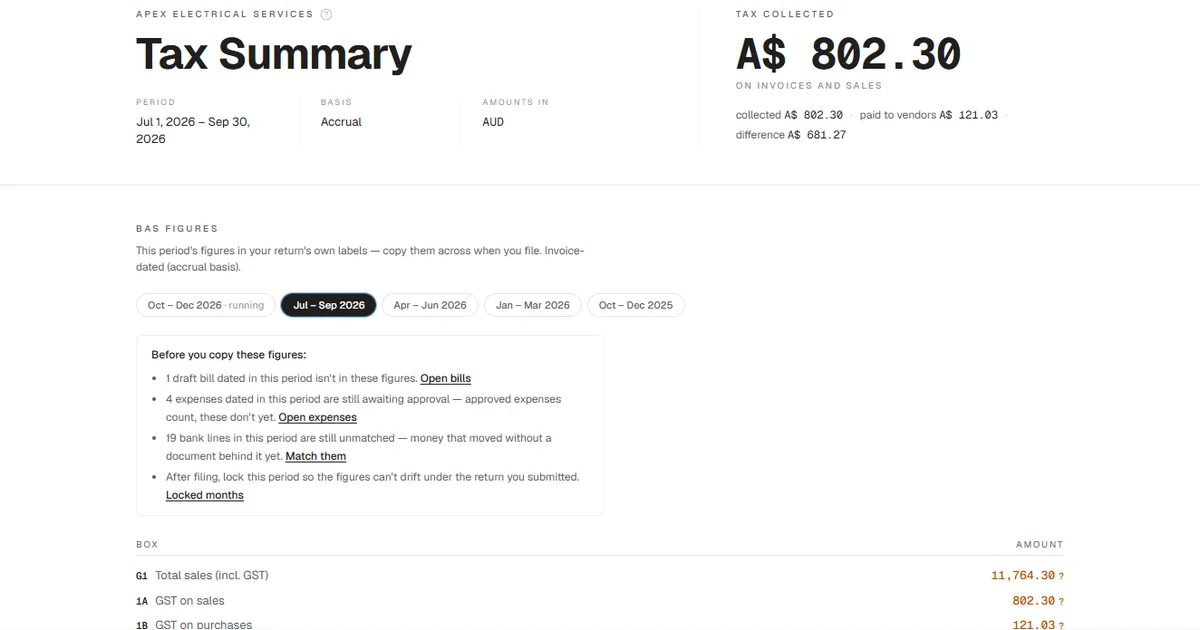
In supported countries the Tax summary shows the figures under your return's own labels. In Australia that's G1, 1A and 1B (what each one means). Papertools gives you the figures. You or your accountant still file the return with your tax office.
Option 1: Export everything in one file
This is the fastest route, and it's included on the free plan.
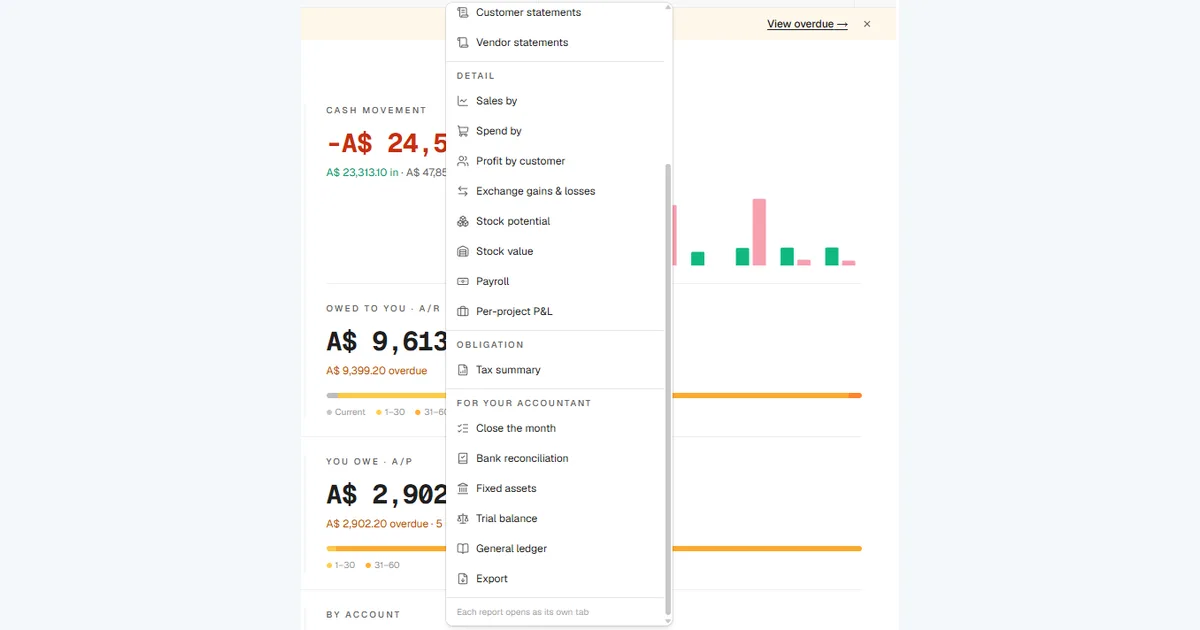
Step 1: Open the export. In Reports, open the report menu. Everything your accountant uses sits in its own group, For your accountant: Close the month, Bank reconciliation, Fixed assets, Trial balance, General ledger and Export.
Step 2: Check what's in it. The Export for your accountant page lists every file, what it holds and how many rows it has for the period. One file is the financial statements PDF. The rest are CSV files your accountant can open in a spreadsheet or bring into their own software.
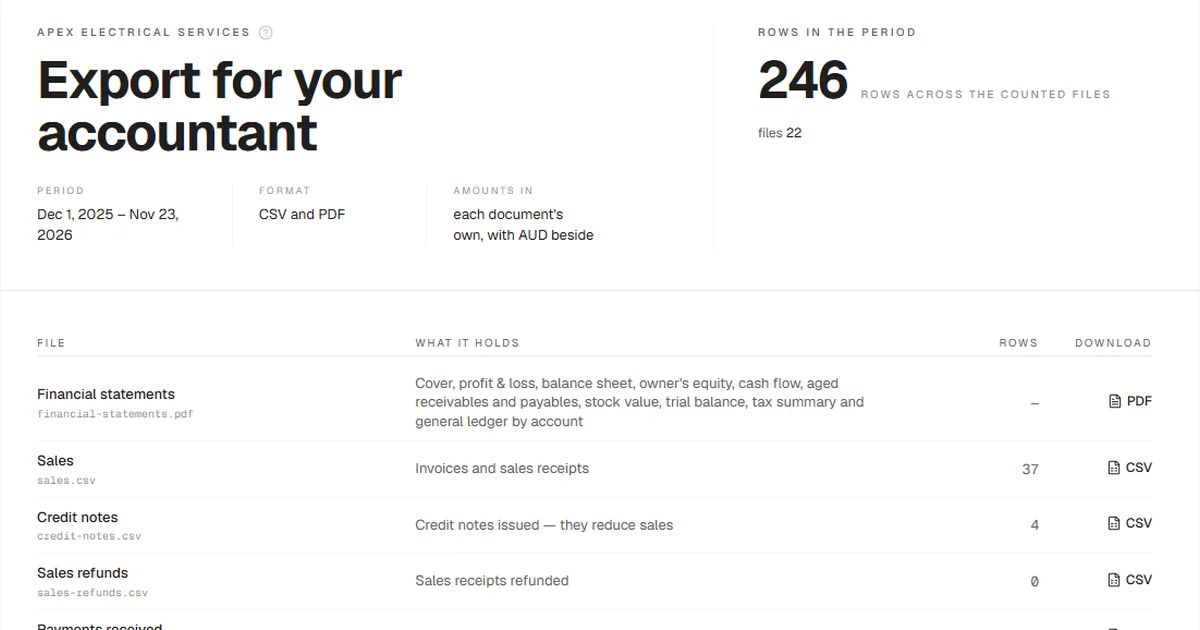
Step 3: Pick the period, then download. Choose the period that matches the request: Last quarter for a quarterly return, Last financial year for year end, or a custom range. Then download All files (ZIP), which bundles every CSV plus the financial statements, or just the Financial statements (PDF) if that's all they asked for.
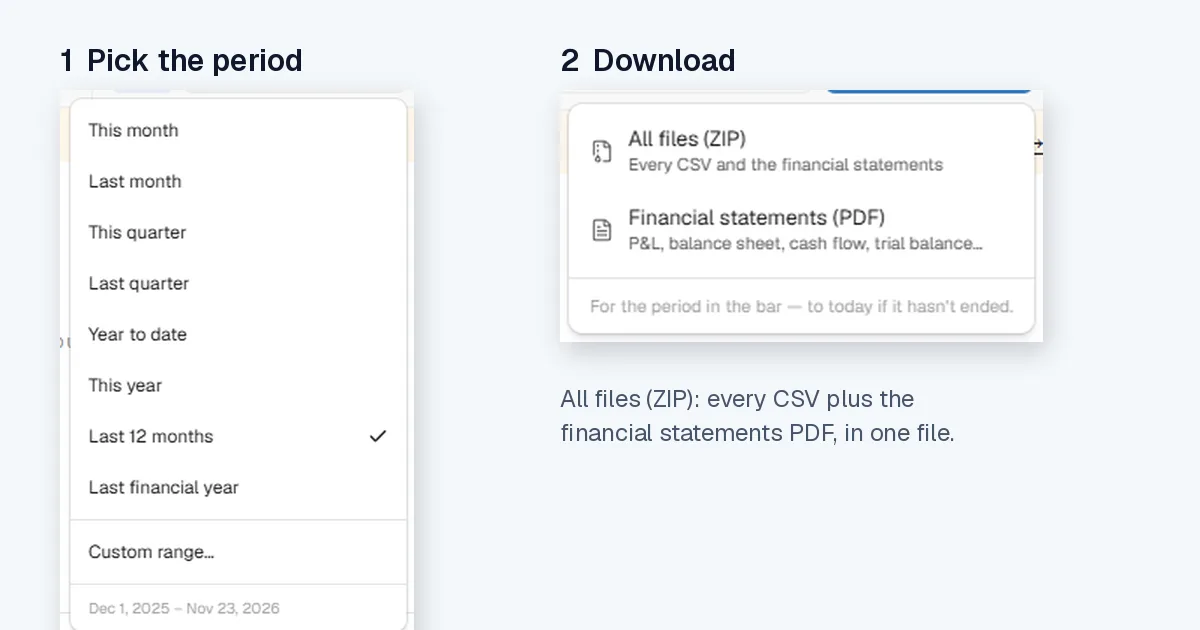
What's in the ZIP
| Group | Files |
|---|---|
| Financial statements (PDF) | Cover, profit and loss, balance sheet, owner's equity, cash flow, aged receivables and payables, stock value, trial balance, tax summary, general ledger by account |
| Money in | Sales, credit notes, sales refunds, payments received, customer deposits, deposit refunds, write-offs |
| Money out | Bills, vendor credits, expenses (approved and paid), payments made |
| Moving money | Transfers between your own accounts |
| Behind the scenes | Journals (one row per line), pay run totals (no staff names) |
| The books | Profit and loss, tax summary, chart of accounts, trial balance, balance sheet, general ledger summary, general ledger |
A few details accountants appreciate:
- Foreign currency is kept honest. Each amount stays in its document's own currency, with your home currency beside it.
- Pay runs are exported as totals, without names, so you can share the file without exposing anyone's pay.
- The trial balance balances. Debits equal credits, which is the first thing an accountant checks.
- Very large ledgers are split by period. The general ledger file holds up to 50,000 lines, so a busy business exporting a long period should export a quarter at a time.
Then attach the ZIP to an email, or drop it in the shared folder your accountant uses. Done.
Option 2: Invite your accountant into your books
The other way is to give your accountant their own login to your workspace. They can open the reports, check a figure and export what they need themselves, any time, without waiting for you.
In Papertools, go to Settings → Team → Members and choose Invite member. They get an email link to join, and anyone you've invited shows under pending invitations until they accept. You can revoke an invitation to disable its link, and set how long invite links stay valid.
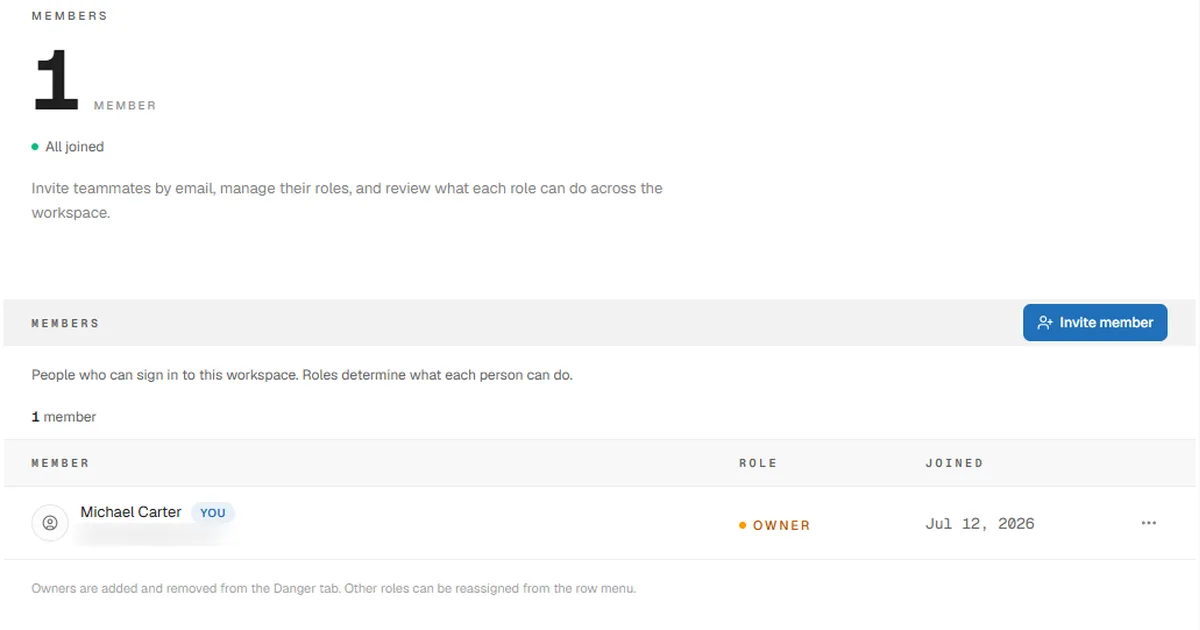
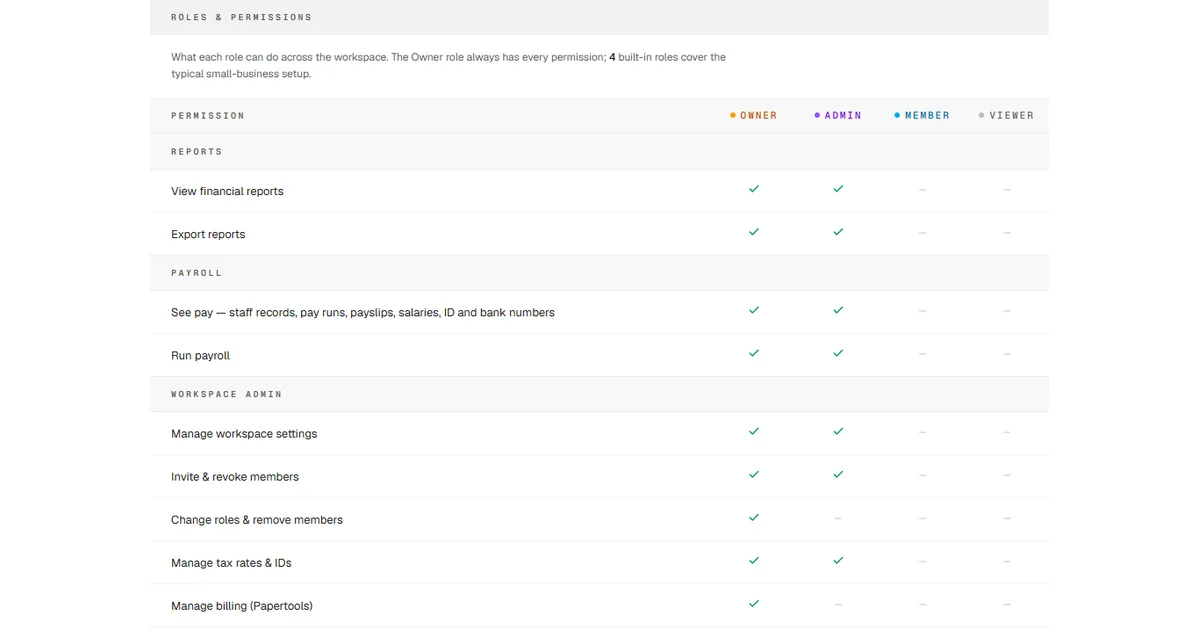
Which role to give them. Viewing and exporting financial reports is limited to the Owner and Admin roles, so today an accountant needs the Admin role to do the job. Admin is a trusted role: it can also run payroll, manage settings and tax rates, and invite or revoke other members. Changing roles, removing members and billing stay with the owner.
What it costs. Inviting team members is part of the paid plans. The free plan is for one person, so on the free plan use Option 1: the export is free.
Export or invite: which one?
| Export one ZIP | Invite your accountant | |
|---|---|---|
| Best for | A clean handover each quarter or year | An accountant or bookkeeper who works on your books regularly |
| Plan | Free plan included | Paid plans |
| Effort for you | A few clicks per period | Set up once |
| What they see | The files for the period you chose | Your live books, any period |
| Control | You decide exactly what leaves your workspace | Admin access, so only invite someone you trust |
| Questions | They email you | They can usually answer them themselves |
Plenty of businesses do both: the export as the formal record of what was filed, and access for the accountant who does the work.
A 15-minute routine that makes every request easy
If the records stay current, "send me everything" stops being a weekend job.
- Weekly (10 minutes): match new bank lines, approve expenses, finish drafts.
- Each quarter (5 minutes): open the Tax summary, clear its checklist, export last quarter or let your accountant in, then lock the period once the return is filed.
- At year end: check the fixed assets, loans and stock count, export the last financial year, and keep the ZIP with your tax records.
Frequently asked questions
What does an accountant need from a small business at year end? A profit and loss, balance sheet, trial balance and general ledger for the year, plus what customers owe you and what you owe suppliers, your assets and loans, stock on hand and payroll totals if you have staff. Those all come from the same underlying records: sales, payments, bills, expenses and matched bank accounts.
What do I need to send for a quarterly BAS, GST or VAT return? The tax charged on your sales and the tax paid on your purchases for the period, with the records complete and bank lines matched. In Papertools the Tax summary shows those figures for the quarter, and the export packages the detail behind them.
Can my accountant just log in to my accounting software? Yes, if you invite them as a team member. In Papertools that's Settings → Team → Members → Invite member, using the Admin role so they can open and export reports. Inviting members is on the paid plans.
Is the accountant export free? Yes. Export for your accountant, including the financial statements PDF and all the CSV files, is included on the free plan.
What if my accountant uses different software? That's what the CSV files are for. Your accountant can open them in a spreadsheet or bring them into the software they use, and the trial balance gives them every account's closing balance in one file.
Does my software file the return for me? Papertools prepares the figures and the records behind them. You or your accountant still lodge the return with your tax office.
Where to go next
- Behind on bookkeeping? How to catch up without panicking — if the four checks above found a pile of unmatched bank lines
- Simpler BAS explained: what goes in G1, 1A and 1B — the Australian quarterly return, label by label
- How to switch accounting software — moving your records across without starting from zero
- What a free accounting plan should include — why the accountant export belongs on a free plan
This article is general information about how bookkeeping works, not tax, accounting or legal advice. Rules differ by country and business. Check with a qualified adviser before acting on anything here. Papertools gives you the figures; the decisions stay with you.