How to Fix an Invoice You Already Sent (Edit, Credit Note or Void?)
Sent an invoice with a mistake? Learn when to edit and resend, issue a credit note or void it, without leaving gaps in your invoice numbers.
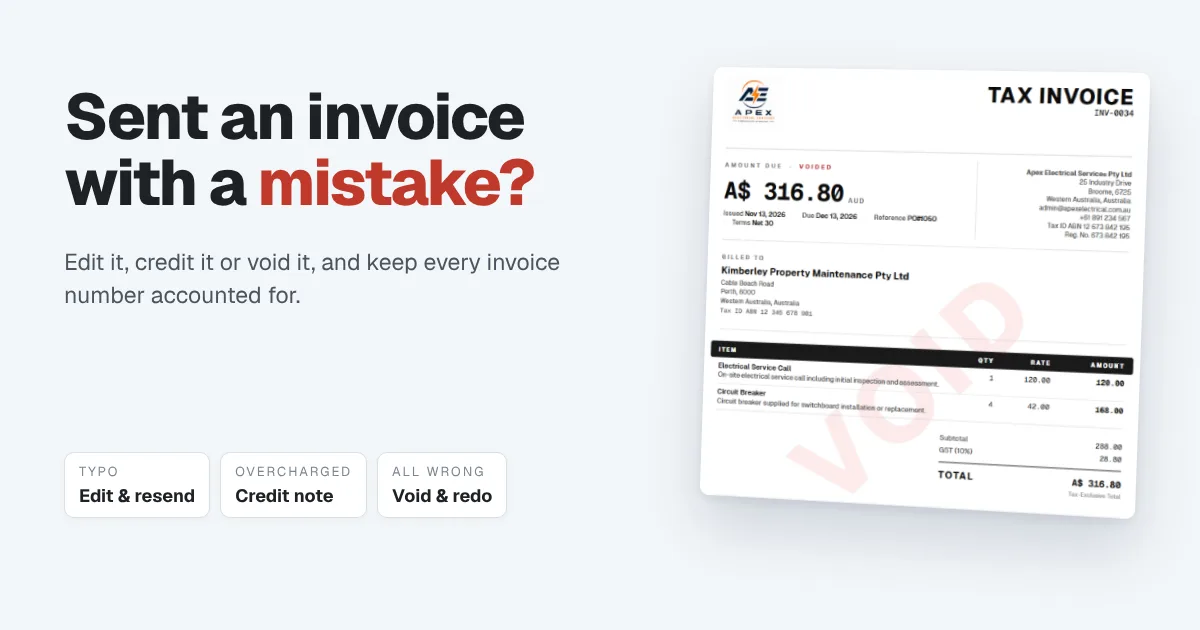
You hit send, and then you see it. The wrong price. A missing line. Last month's date. Or worse, the right invoice sent to the wrong customer.
It happens to every business, and it's easy to fix. What matters is fixing it the right way. Some mistakes can simply be corrected and resent. Others need a credit note. A few mean cancelling the invoice and starting again. Choose the wrong fix, and you end up with gaps in your numbering, a customer who's confused about what they owe, or books that don't match the invoices your customer has on file.
The short answer: if the invoice hasn't been paid and the mistake is small, edit it, keep the same number and resend it. If part of it shouldn't be charged, or it has already been paid, issue a credit note. If it's completely wrong, such as the wrong customer, and nothing has been paid, void it and issue a new one. Never delete an invoice you've sent. The rest of this guide explains each fix and when to use it.
The one thing not to do: delete it
When an invoice is wrong, the instinct is to delete it and pretend it never happened. Don't.
Once an invoice has gone out, it exists on your customer's side whether you keep it or not. They may have saved it, forwarded it to their accounts team or entered it in their own books. If it disappears from yours, your invoice numbers have a gap nobody can explain, and the next time your accountant or a tax office asks what happened to that number, you won't have an answer.
The rule is simple: a sent invoice is corrected, credited or cancelled, but never erased. Every fix below keeps the record intact.
Three ways to fix an invoice, and when to use each
1. Edit it and resend it. For small mistakes on an invoice that hasn't been paid: a typo in the description, a wrong unit price, a missing line, the wrong due date. You correct the invoice, keep the same number and send the new version, so your customer has the right one.
2. Issue a credit note. For when the invoice was right when you sent it, but part of it shouldn't be charged now. Returned goods, a goodwill discount, a job that came in under the quote, or a mistake on an invoice that has already been paid. The original invoice stays as it is, and the credit note reduces what the customer owes or becomes credit they can use next time.
3. Void it and start again. For an invoice that's fundamentally wrong: the wrong customer, the wrong job, or one sent twice by accident. The invoice is cancelled but stays on record with its number, marked as void, and you issue a fresh one.
A quick way to decide
| What went wrong | Has it been paid? | The right fix |
|---|---|---|
| Typo, wrong price or a missing line | No | Edit and resend |
| You undercharged | No | Edit and resend, or send a second invoice for the difference |
| You overcharged, or part of the work shouldn't be billed | Either | Credit note for the difference |
| Goods returned or a discount agreed after the fact | Either | Credit note |
| Wrong customer, wrong job or a duplicate | No | Void and issue a new invoice |
| Anything wrong on an invoice that's been paid | Yes | Credit note, then refund or keep it as credit |
The pattern behind the table: once money has moved against an invoice, you don't edit or void it. You adjust it with a credit note, so the payment, the invoice and the correction all stay visible.
Check your tax rules before editing
In countries with GST or VAT, the invoice you issue is often a tax document your customer uses to claim tax back. In some of those countries, once a tax invoice has been issued, the rules expect a correction to be made with a credit note (sometimes called an adjustment note) rather than by changing the original. If you're registered for GST or VAT, check what applies where you're registered, or ask your accountant which fix they'd like you to use.
Tell your customer what changed
Whatever fix you use, send a short note with it. Customers don't mind a corrected invoice. What they mind is not knowing which one to pay.
- Edited: "We've corrected the price on INV-0032. The updated invoice is attached. Please use this version."
- Credit note: "We've issued credit note CN-0010 for $22.00 against INV-0032, so the balance is now $192.50."
- Voided: "Please disregard INV-0032, which we've voided. The correct invoice is INV-0035."
Mentioning both numbers gives their bookkeeper something clear to work with, and it stops the "do we still owe you for 0032?" email a week later.
A worked example
An electrical contractor invoices a property maintenance company $214.50 for a monthly safety inspection ($195.00 plus 10% tax) on INV-0032. Here's how three different mistakes would be fixed.
| The mistake | The fix | What the customer ends up with |
|---|---|---|
| The description says "Sept" instead of "Oct" | Edit and resend INV-0032 | One invoice, INV-0032, $214.50, now correct |
| They agreed a $20 discount after the visit | Credit note for $22.00 ($20 plus $2 tax) | INV-0032 for $214.50, less $22.00 credit: $192.50 to pay |
| It was meant for a different client | Void INV-0032, issue INV-0035 to the right one | INV-0032 marked void, INV-0035 for the correct client |
In every case, INV-0032 still exists in the records. Nothing has been deleted, and anyone checking the books can see exactly what happened and why.
How Papertools helps you fix an invoice
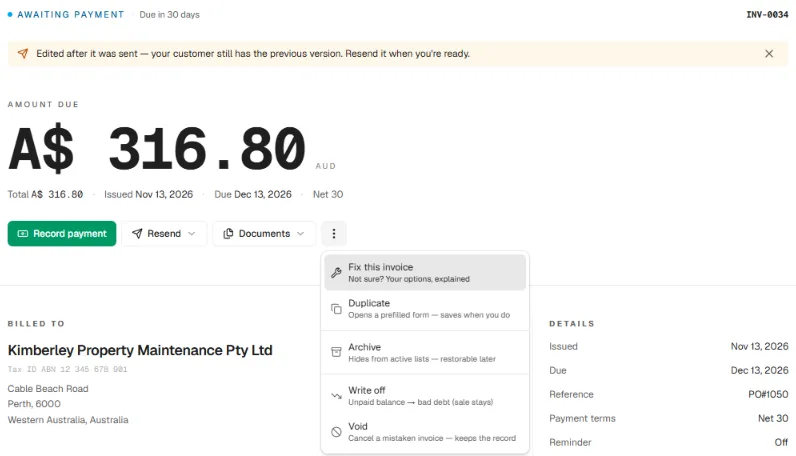
In Papertools, you don't have to work out which fix applies. Open the invoice, choose Fix this invoice from the menu, and Papertools shows the options that suit that invoice's current state: Edit & resend, Issue a credit note or Void & start again, each with a plain explanation of when to use it. If an option would leave your books inaccurate for that invoice, it isn't offered.
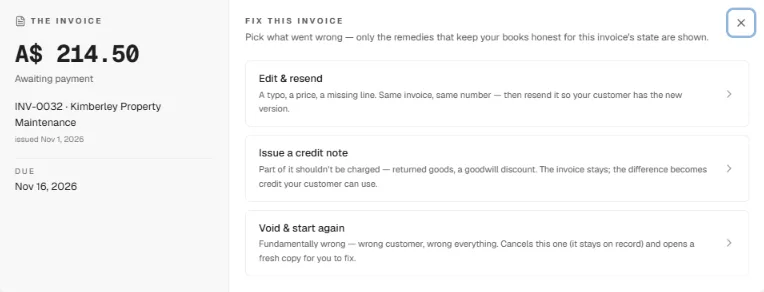
Edit & resend keeps the same invoice and the same number. Once you've made the change, Papertools reminds you that your customer still has the previous version, so a corrected invoice never sits unsent by accident. Resend it by email or share it straight from the invoice.
Issue a credit note leaves the original invoice untouched and records the difference as credit for that customer. A credit note has its own number, its own date and a reference field for the customer's return or PO number, and it can be applied to the invoice or kept for their next one.
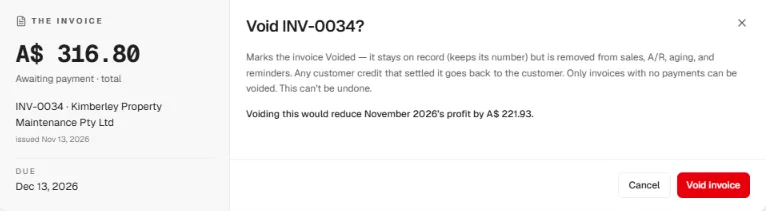
Void & start again cancels the invoice but keeps it on record, with its number, marked Voided. It's removed from your sales, from what customers owe you, from your aging report and from reminders, so nobody chases money that was never owed. Papertools also opens a fresh copy for you to correct and send. Before you confirm, it shows how voiding will change that month's profit. And because voiding is only for invoices with no payments against them, a paid invoice is always corrected with a credit note instead.
A voided invoice's PDF is stamped VOID, so if anyone opens an old copy, there's no doubt it's been cancelled. And because Papertools numbers an invoice when it's sent, not when it's drafted, the drafts you abandon never leave gaps in your sequence.
The same menu also holds Write off, for an invoice that was correct but will never be paid. That's a different situation, covered in What to Do When a Client Won't Pay an Invoice.
All three fixes, credit notes and voiding among them, are on every plan, the free Essential plan included. You can start free with Papertools, with no credit card.
What this won't fix
- The customer's own records. If they've already entered the wrong invoice in their books, they still need to update it. Your note with both numbers makes that easy.
- Money already paid. A credit note records what's owed back. Sending a refund, if you're giving one, still happens from your bank.
- Your local tax rules. How a correction must be made on a tax invoice depends on where you're registered. Your accountant can confirm it.
- A mistake nobody spots. Check the customer, the amount and the date before you send, especially on your first invoice to a new client.
Quick answers
Can I edit an invoice after sending it? Usually, yes, if it hasn't been paid and the mistake is small. Keep the same number, correct it and resend it. If you're registered for GST or VAT, check whether your country expects a credit note instead.
What's the difference between voiding an invoice and a credit note? Voiding cancels the whole invoice as if it should never have been issued, while keeping it on record. A credit note keeps the invoice and reduces what's owed by part or all of it. Use a credit note once any payment has been made.
Should I delete an invoice I sent by mistake? No. Void it instead. Deleting leaves a gap in your numbering and no record of what happened.
Does a voided invoice keep its number? Yes. The number stays used, so your sequence has no gaps, and the invoice is clearly marked as void.
What if I undercharged a customer? If they haven't paid yet, edit the invoice and resend it with a short explanation. If they've already paid, send a separate invoice for the difference.
What if the customer already paid the wrong amount? Issue a credit note for anything they overpaid, then refund it or keep it as credit for their next invoice, whichever you agree with them.
Where to go next
- How to Number Invoices (Sequences, Restarting, and Gaps) — why the sequence matters when something goes wrong
- A Client Paid Before the Invoice Was Ready: How to Record It — how customer credit works
- What to Do When a Client Won't Pay an Invoice — when to write an invoice off instead
- What Accounts Payable Needs on Your Invoice (So It Gets Paid, Not Sent Back) — getting it right the first time
- How to Write an Invoice (What to Include and What to Leave Off) — the essentials every invoice needs
This article is general information about how invoicing works, not tax, accounting or legal advice. Invoice and tax rules differ by country and business. Check with a qualified adviser before acting on anything here. Papertools gives you the figures; the decisions stay with you.