What to Do When a Client Won't Pay an Invoice
Work through the escalation ladder first. Then decide whether the invoice should be voided, credited, or written off — because they are not the same thing.
Every business has one. The job went fine, the invoice went out, the due date came and went, and now there's silence.
Most of the advice on this jumps straight to debt collectors and legal letters. That's the wrong end of the problem. The vast majority of unpaid invoices aren't disputes — they're inertia, and they get resolved by a phone call. The small minority that genuinely won't be paid need something else entirely: a decision about what happens to the invoice in your books.
Here's the order to work through it, and what to do when the money really isn't coming.
First: check it isn't your fault
Before chasing anyone, spend two minutes on the invoice itself. A surprising share of "they won't pay" turns out to be "they can't."
- Did it arrive? Check the email actually sent and wasn't bounced or filtered. If you sent it to an individual at a company with an accounts inbox, it may never have entered their system.
- Is it addressed to the right entity? A large customer's accounts payable will reject an invoice made out to the trading name when the paying entity is a different registered company.
- Is a purchase order number missing? For any business with a finance department, this is the single most common reason an invoice sits unprocessed. It doesn't get queried — it just never gets scheduled.
- Is the due date actually past? Payment terms are easy to misremember. Net 30 from issue date is not the same as 30 days from when they opened it.
Fixing any of these turns a collections problem back into an admin problem.
The escalation ladder
Work down this in order. Skipping steps costs you the relationship without getting you paid faster.
1. The reminder. Short, factual, no apology. One line stating the invoice number, the amount, and the date it was due. Most invoices get paid at this step. We've written four templates you can copy for the different stages.
2. The phone call. After two ignored emails, call. This feels harder than it is and it works far better than another message. You're not demanding — you're asking whether there's a problem with the invoice. Nine times in ten the answer is that it's sitting with someone who's been away.
3. The statement. Send a statement of account showing everything outstanding rather than a single invoice. It changes the conversation from one document to a relationship, and it's harder to ignore.
4. Stop work. If there's ongoing work, this is your real leverage and it's far more effective than any letter. Say it plainly and without drama: work pauses until the account is current. Do it before you're three jobs deep, not after.
5. The formal demand. A written notice stating the amount, the history, and what happens next. This is the last step you take yourself, and it matters mostly because it creates a record.
6. Collections or small claims. Both cost money and both usually end the relationship. Worth it above a threshold you should decide in advance — for most small businesses that number is somewhere between one and three thousand. Below it, the time and fees exceed what you'd recover.
When to accept it isn't coming
There's no rule for this, but there are signals: the business has stopped trading, the phone is disconnected, they've gone into insolvency, or you've simply decided the amount doesn't justify another hour of your attention.
At that point the invoice stops being a collections problem and becomes a bookkeeping one. And this is where most small businesses do the wrong thing — they delete it.
Deleting an unpaid invoice is the worst available option. It removes the record that the work was done, and if you're on accrual accounting you've already declared that sale as income. Quietly making it disappear means your books no longer match what you filed.
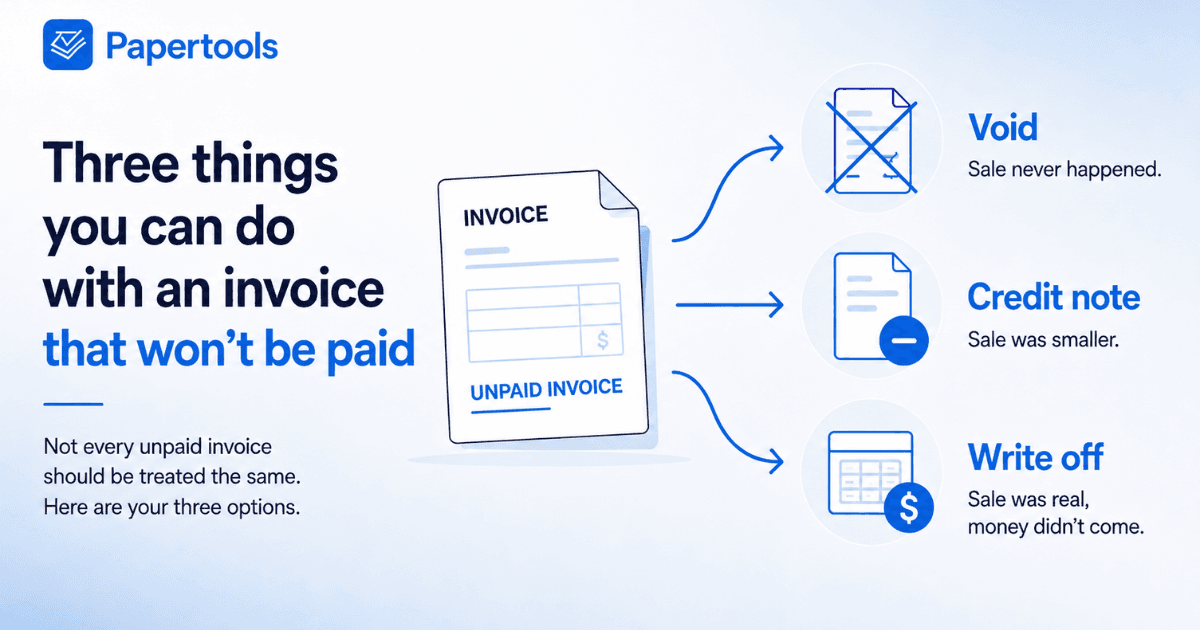
There are three correct options, and they're different from each other.
Void, credit note, or write off
Void is for an invoice that should never have existed. Wrong customer, duplicate, priced from the wrong quote. The sale didn't happen, so it comes out of your revenue entirely. The number stays locked and can't be reused — you want the gap, because it proves nothing was deleted.
A credit note is for an invoice that was right when you sent it, but shouldn't stand now. You agreed to reduce the price, the customer returned something, you resolved a dispute by knocking off the call-out fee. A credit note reverses part or all of the sale and, crucially, it's a document the customer receives. It's the honest option when you've agreed something with them.
A write-off is for an invoice that was correct, that you still believe you were owed, and that you've given up collecting. This is the one people get wrong, because it does something none of the others do: the sale stays in your revenue. You earned it. What changes is that the unpaid amount becomes a bad-debt cost on your profit and loss, and the invoice drops out of what that customer owes you.
That distinction matters at tax time. A credit note says the sale was smaller than you thought. A write-off says the sale was real and the money never arrived. They produce different numbers and they're not interchangeable.
The tax question nobody mentions
If you charged tax on that invoice — VAT, GST, sales tax — you may have already declared and paid it to the tax office on a sale you never got paid for.
Some tax authorities let you take that back. Most attach conditions: a waiting period, evidence the debt is genuinely bad, or a requirement that you've made real attempts to collect. Some don't allow it at all, in which case the tax is simply part of what the bad debt cost you.
This is worth one email to your accountant, because the amount is real. On a $2,000 invoice with 10% tax added, that's $200 sitting with the tax office on money you never received.
Most systems ask this at the moment you write off, so it's worth knowing your position before you get there. Leaving it unticked forfeits nothing — the tax stays owed to you until you claim it. What it does mean is that the recovery becomes something you and your accountant handle later, rather than something your books already did for you.
What this won't fix
None of this recovers the money. A write-off is an accounting decision, not a collection strategy, and the invoice you write off today is gone whether or not your books are tidy about it.
It also won't help if the underlying problem is that you're invoicing too late or with terms that are too generous. If the same customers keep going overdue, the fix is upstream — tighter terms, deposits, and reminders that fire before the due date, not better handling of the aftermath.
And it isn't tax advice. Whether you can recover the tax, and when a debt counts as genuinely bad, depends entirely on where you operate. Your accountant is the person to confirm that.
How Papertools handles it
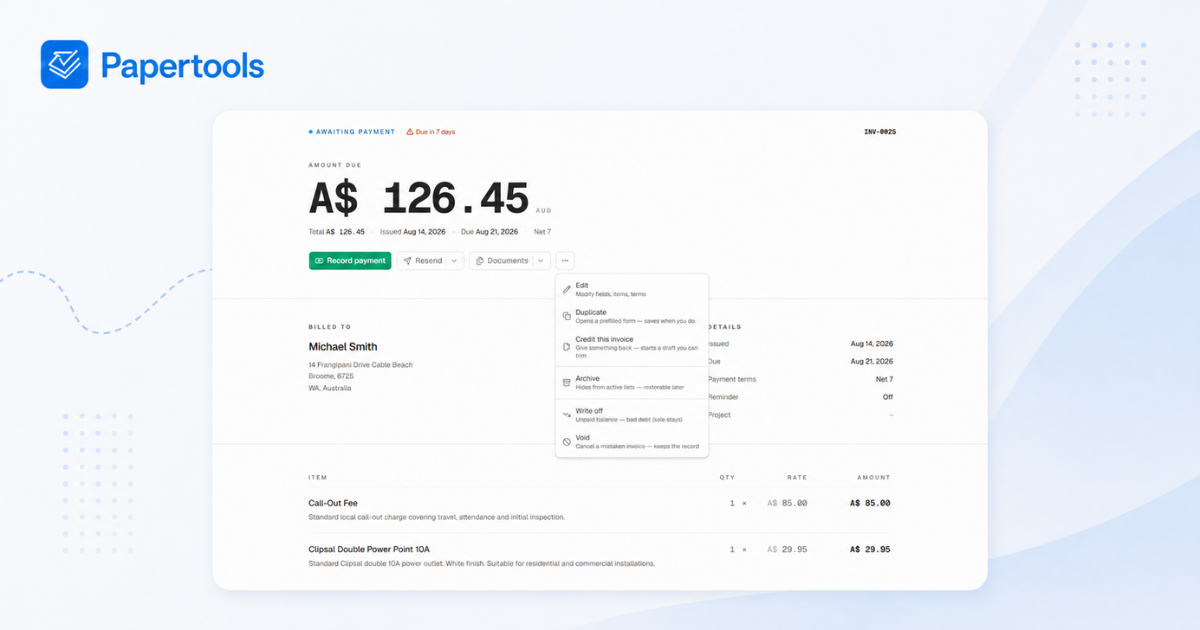
All three options sit in the same place — open the invoice, then the actions menu. Void, credit, and write off are separate actions with separate outcomes rather than one ambiguous delete.
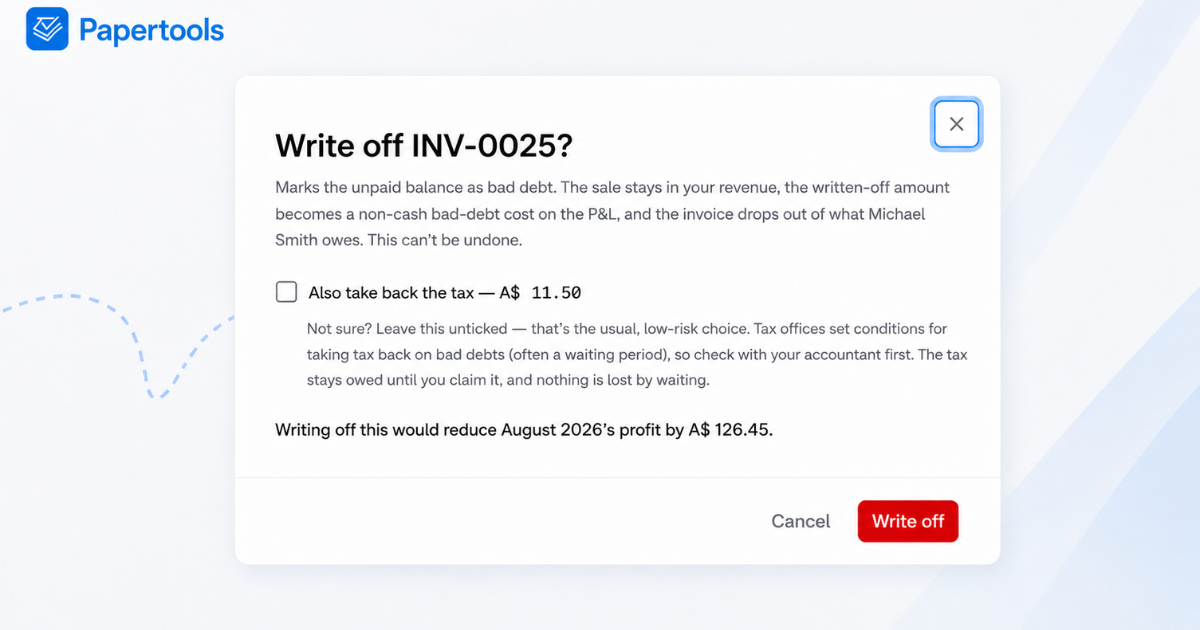
Writing off tells you what it's about to do before you commit. Leave the tax option unticked and the full balance goes to bad debt — the figure at the bottom is the whole amount coming off this month's profit.
Tick it and the same dialog recalculates in front of you: a smaller hit to profit, and the tax moving back off what you owe the tax office. Both numbers are stated before you commit, and what you're told is what gets posted.
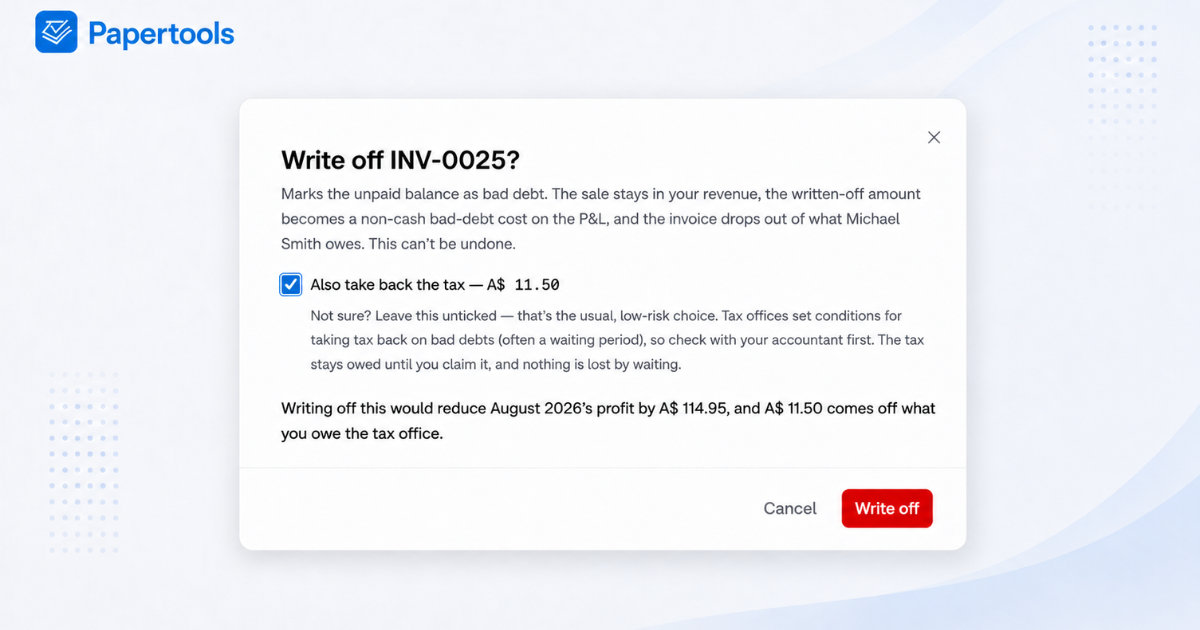
The tax option only appears if you've turned tax recovery on in your settings, so it stays out of the way for anyone who doesn't need it.
Partial payments are handled proportionally. If a customer paid half and vanished, only the unpaid remainder is written off, and the tax figure is calculated on that remainder rather than the original total.
Crediting an invoice starts a draft you can trim, so a partial credit is a matter of deleting the lines that still stand. And because every action is recorded on the invoice's own activity log, you can see six months later exactly what was decided and when.
Where to go next
- How to Get Clients to Pay Invoices on Time — the upstream fix, and the pillar for this cluster
- How to Write a Late Payment Reminder Email (4 Templates) — the exact wording for steps 1 and 5
- How to Read an Aging Report — spotting the invoices heading this way before they get there
- Invoice Payment Terms: Should You Use Net 7, 15, or 30? — choosing terms that suit your cash cycle
- Edit, void, or duplicate a document — the step-by-step in Papertools
- Send payment reminders — setting the chase running so you don't have to