What Accounts Payable Needs on Your Invoice (So It Gets Paid, Not Sent Back)
What accounts payable checks before paying your invoice: PO number, legal name, tax ID and more. A checklist to get business clients to pay on time.
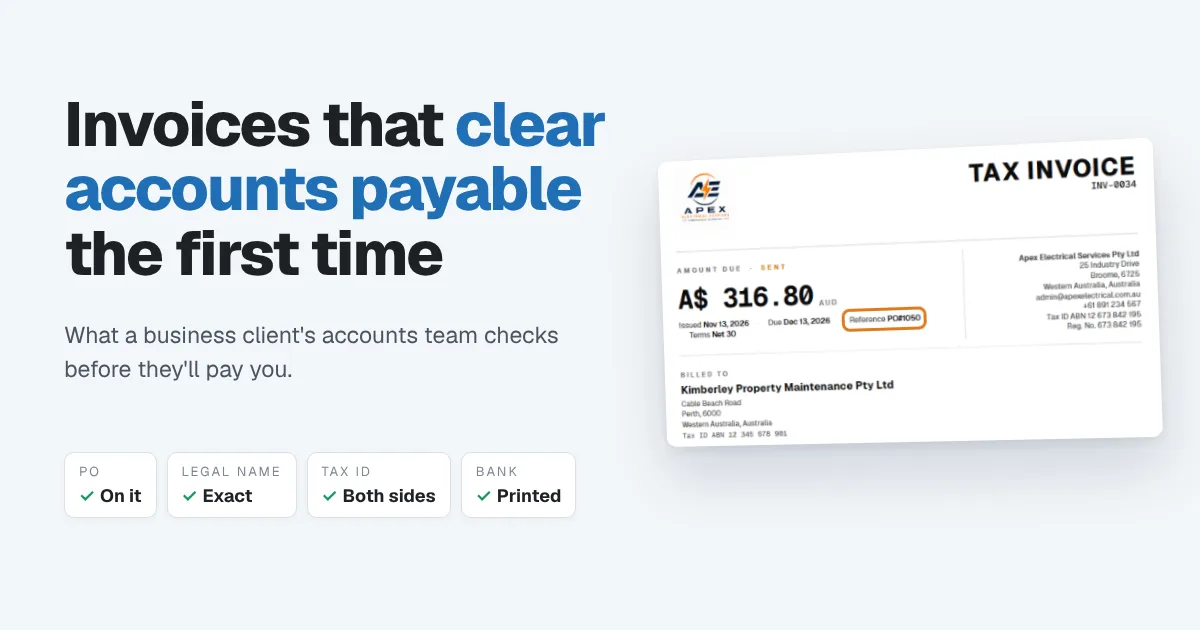
You did the work, sent the invoice to a business client, and waited. Thirty days later there's no payment. When you finally chase it, the reply comes back from someone you've never spoken to: "We can't process this without a PO number." Or "This isn't addressed to our registered entity." Or simply, "We never received it."
Nobody refused to pay you. Your invoice just didn't make it through their accounts payable process. Getting paid by a business is rarely about persuading anyone. It's about sending an invoice their accounts team can approve without asking you a single question. This guide shows exactly what that invoice needs.
Why business clients pay differently
When you invoice an individual, the person who hired you is usually the person who pays. In a business, they're almost never the same person.
Your contact asked for the work. But the invoice goes to accounts payable, often a shared inbox and a small team handling hundreds of supplier invoices a month. Before anything is paid, they typically:
- Match the invoice to an order. Many businesses only pay against a purchase order (PO) or an approved reference. No match, no payment.
- Check it's addressed to the right company. Larger groups often have several legal entities, and each pays its own bills.
- Get it approved. The person who ordered the work, or the budget owner, confirms it was delivered.
- Schedule it into a payment run. Many businesses pay suppliers in batches, weekly, every two weeks or monthly, not the day an invoice is approved.
Every one of those steps is a place your invoice can stop. And when it stops, it rarely comes back to you straight away. It sits in a queue until someone has time to ask.
Why accounts payable sends invoices back
Most delayed business invoices come down to the same short list:
- No PO number or reference. The single most common reason. Without it, the accounts team can't tell which order your invoice belongs to.
- The wrong legal name. You invoiced the trading name, a branch or your contact personally, not the company that actually pays.
- Missing tax details. In many countries, the buyer needs your tax registration number (and sometimes their own) on the invoice to claim the tax back.
- Sent to the wrong person. Your contact forwarded it, went on leave or never forwarded it at all.
- The amount doesn't match the order. Extra work wasn't approved, or the price differs from the quote.
- No payment details. The accounts team has to email you to ask where to send the money.
- An unclear due date. "Due on receipt" means little to a team that pays in batches.
Each of these turns a 30-day invoice into a 60-day one, without anyone deciding to pay you late.
What to put on an invoice for a business client
Use this as a checklist before you send:
| Item | Why accounts payable needs it |
|---|---|
| Your legal business name, address and tax registration number | Confirms who is billing and lets them claim tax where it applies |
| The words "Tax invoice" where your country requires them | Some tax systems only accept a tax invoice as proof for a claim |
| Their exact legal entity name and billing address | Makes sure the right company pays and records it |
| Their tax ID, where required | In some countries, required above certain invoice amounts |
| Their PO number or reference, clearly visible | Lets them match your invoice to the order in seconds |
| A unique invoice number | Prevents duplicates and makes your invoice easy to find |
| Issue date, due date and payment terms | Tells them which payment run it belongs in |
| Line items that match the order | Speeds up approval: no questions, no partial holds |
| Tax shown separately, and the total | Lets them record the tax correctly |
| Your bank or payment details | Removes the last reason to email you |
Ask three questions before the work starts
The easiest invoice to get paid is one you set up properly at the start of the job. When a new business client says yes, ask:
- "Do you need a PO number on the invoice?" If they do, get it before you start, not after you've finished.
- "Who should invoices go to?" Get the accounts payable email address, not just your contact's, and the exact legal name and address to bill.
- "When do you pay suppliers?" If they pay on the last Friday of the month, an invoice that arrives two days late waits almost a month.
Larger clients may also ask you to fill in a supplier setup form with your bank details and tax information before they can pay you at all. Do it straight away. It's often the first payment that takes longest.
A worked example
A small electrical contractor does a service call for a property maintenance company and supplies four circuit breakers. Their contact gives them PO 1050 before the job.
| Field | On the invoice |
|---|---|
| Billed to | Kimberley Property Maintenance Pty Ltd, with billing address and tax ID |
| Reference | PO#1050 |
| Lines | Electrical service call, $120.00; 4 circuit breakers at $42.00, $168.00 |
| Tax | $28.80 (10%), shown separately |
| Total | $316.80 |
| Terms | Net 30, due Dec 13 |
| Payment details | Bank name and account details printed at the bottom |
Now compare two versions of the same invoice. Say the client pays suppliers in a run every two weeks.
With the PO number on it, accounts payable matches it to PO 1050, the contact approves it, and it goes into the next run after approval. Without the PO number, it waits in the queue until someone asks your contact, your contact asks you, you send a new copy, and it starts the process again. That can easily cost you an extra payment run, or two. Same work, same client, weeks apart.
How Papertools handles invoices for business clients
Papertools is built so the details an accounts team checks are part of the invoice, not something you have to remember to type in.
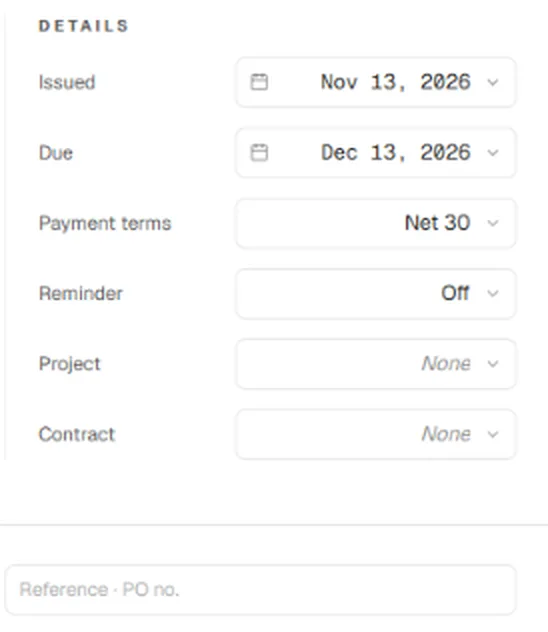
Every invoice has a Reference · PO no. field beside the summary line, along with the issue date, due date and payment terms. Pick the terms and the due date fills in for you. You can also set an overdue reminder on each invoice, and link it to a project or contract.
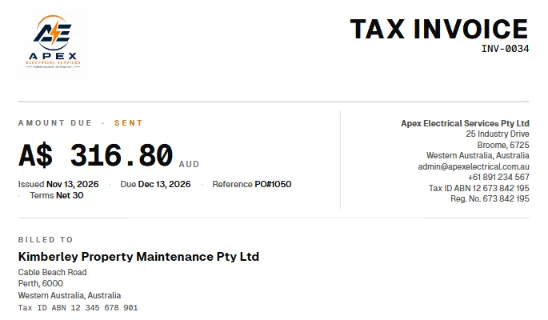
The reference prints on the invoice right next to the dates and terms, where an accounts team looks first. The client's details come from their customer record, so their full legal name, billing address and tax ID print under Billed to on every invoice, without retyping. Your own business name, address, tax ID and registration number print at the top.
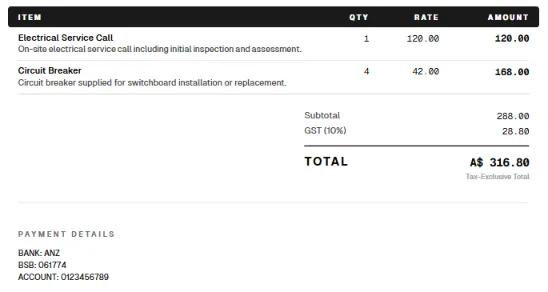
Line items, tax and the total are laid out clearly, with tax shown separately. The payment details you save once print at the bottom of every invoice, so nobody has to ask where to send the money.
A few more things help on the business side. You can save extra email addresses on a customer, so invoices reach their accounts team as well as your contact. Invoice numbers are assigned when an invoice is sent, so drafts never leave gaps in your numbering. And if a payment run is missed, automatic overdue reminders follow up for you until the invoice is paid, then stop on their own.
Standard invoicing, including the reference field, customer details and overdue reminders, is part of every plan, including the free Essential plan. See the pricing page for the full comparison.
You can start free with Papertools, with no credit card.
What this won't fix
- The client's payment runs. A perfect invoice still waits for their next run. Knowing when it is lets you time your invoice.
- Work they didn't approve. If the invoice includes extras that weren't on the order, expect a hold until they're signed off.
- Their internal delays. Approvals can stall when people are away. A polite follow-up with the PO number and invoice number usually moves it.
- Supplier setup paperwork. If they need your details on their own form, the invoice can't be paid until that's done.
Quick answers
What is a PO number on an invoice? A purchase order number is the client's own reference for the order they approved. Putting it on your invoice lets their accounts team match your invoice to that order and pay it.
Where should the PO number go on an invoice? Near the top, close to the invoice number and dates, where it can be seen at a glance. Don't bury it in the line items or the notes.
Can a business refuse to pay an invoice without a PO number? Many companies won't process an invoice without one, as a matter of internal policy. The debt is usually still owed, but the payment waits until the PO is supplied.
What if my client doesn't use purchase orders? Ask what reference they'd like instead, such as a job number, a project name or your contact's name, and put that in the reference field.
What's the difference between an invoice and a tax invoice? In countries with GST or VAT, a tax invoice includes the specific details a business needs to claim the tax back, such as your tax registration number and the tax amount. The exact rules vary by country.
How long do accounts payable teams take to pay? It depends on their payment terms and how often they run payments. Ask at the start of the job, and invoice in time for the run you want.
Where to go next
- How to Write an Invoice (What to Include and What to Leave Off) — the essentials every invoice needs
- How to Number Invoices — numbering that accounts teams can trust
- Invoice Payment Terms: Should You Use Net 7, 15, or 30? — choosing terms for business clients
- How to Get Clients to Pay Invoices on Time — the habits that get invoices paid faster
- How to Write a Late Payment Reminder Email (4 Templates) — what to send when a payment run is missed
This article is general information about how invoicing works, not tax, accounting or legal advice. Invoice and tax rules differ by country and business. Check with a qualified adviser before acting on anything here. Papertools gives you the figures; the decisions stay with you.