How to Match Customer Payments When There's No Reference
A payment landed with no invoice number. How to work out which invoice it belongs to, handle combined and part payments, and stop it happening again.
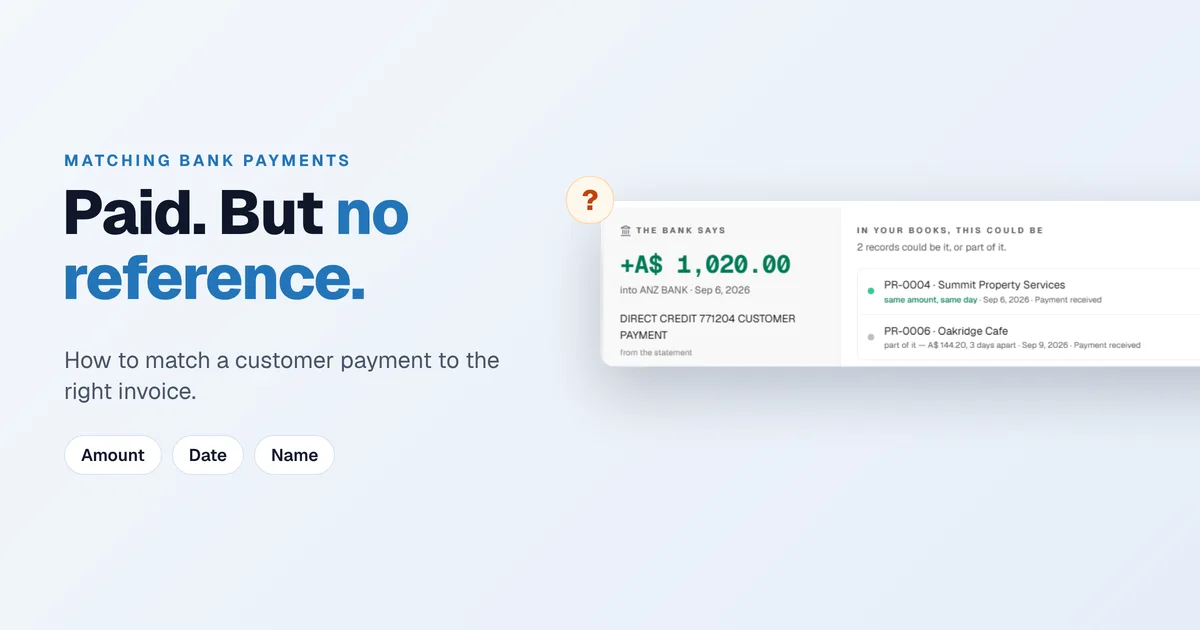
The bank line says DIRECT CREDIT 771204 CUSTOMER PAYMENT +$1,020.00. No invoice number, no name you recognise, no clue which job it was for.
Every business that invoices gets these. A customer pays from a banking app that cuts the reference short, or from a personal account under a different name, or pays three invoices in one go, or pays half now and half later. The money is real, but until it's matched to the right invoice your books say the customer still owes you, your reminders keep going out, and your bank balance and your records disagree.
This guide covers why payments arrive without a reference, how to stop most of them at the source, how to work out which invoice a payment belongs to, and how to handle the hard cases: combined payments, part payments and money that arrives before there's an invoice at all.
The short answer
- Prevent it: put "Please use the invoice number as your payment reference" in the payment details on every invoice, and ask business customers for a remittance advice when they pay several invoices at once.
- When it happens anyway: match on amount first, then date, then name. An exact amount within a few days of the due date is usually the answer.
- Combined payment: record one payment and split it across the invoices it covers.
- Part payment: record what arrived and leave the rest owing on the invoice.
- Can't tell? Set the line aside and ask the customer, with a statement attached. Never guess and never record the money twice.
Why payments arrive without a reference
| What happened | What you see in the bank |
|---|---|
| The customer's banking app shortened or dropped the reference | A generic "CUSTOMER PAYMENT" or a bank code |
| They paid from a personal or different business account | A name you don't recognise |
| They paid several invoices together | One amount that matches none of your invoices |
| They paid part of an invoice | An amount smaller than anything you've issued |
| They paid before you invoiced | Money with no invoice to match at all |
| Their accounts team paid a batch | One payment, a reference that means something only to them |
Most of these are not the customer being careless. They're how bank transfers work. So the fix is half prevention and half a reliable way to match what still slips through.
Step 1: Stop most of it at the source
A few small changes cut unreferenced payments dramatically:
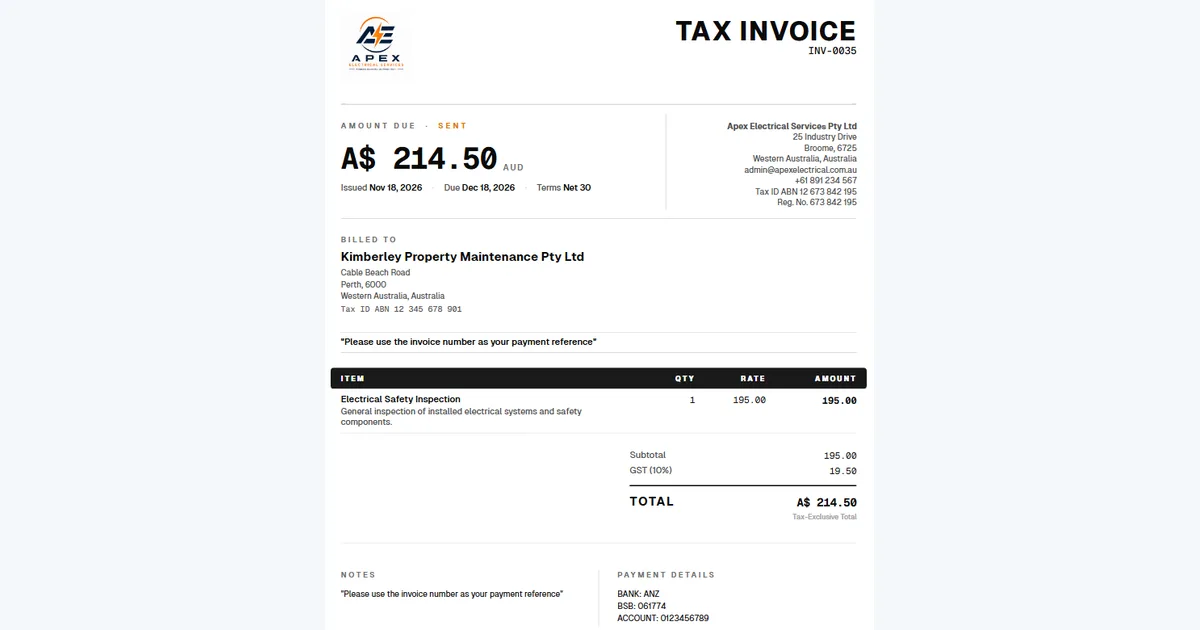
- Ask for the reference in plain words. Add a line such as "Please use the invoice number as your payment reference" to your invoice notes or payment details. Customers follow instructions they can see on the invoice itself.
- Keep invoice numbers short. "INV-0033" survives a truncated reference field. A long project name doesn't.
- Ask business customers for a remittance advice. When an accounts team pays several invoices together, a short remittance email listing what they paid saves you the detective work. If they work from purchase orders, put their PO number on the invoice too (what accounts payable teams need on an invoice).
- Send a statement to customers with several open invoices. It shows them exactly what's owed, so they're more likely to pay whole invoices rather than round numbers.
In Papertools, a line in the invoice notes prints on every invoice you send, so the request travels with each invoice and its number.
Step 2: Match by amount, then date, then name
When a payment arrives without a reference, work through the clues in this order:
- Amount. An exact match to one open invoice is the strongest clue you have. If two invoices share that amount, move on to the next clue.
- Date. A payment close to an invoice's due date, or a few days after you sent a reminder, usually belongs to that invoice.
- Name. Even a shortened or slightly different name on the bank line narrows it down.
- Ask. If the clues don't agree, don't force it. A one-line email ("We received $1,020 on 6 September, which invoice was this for?") settles it in minutes.
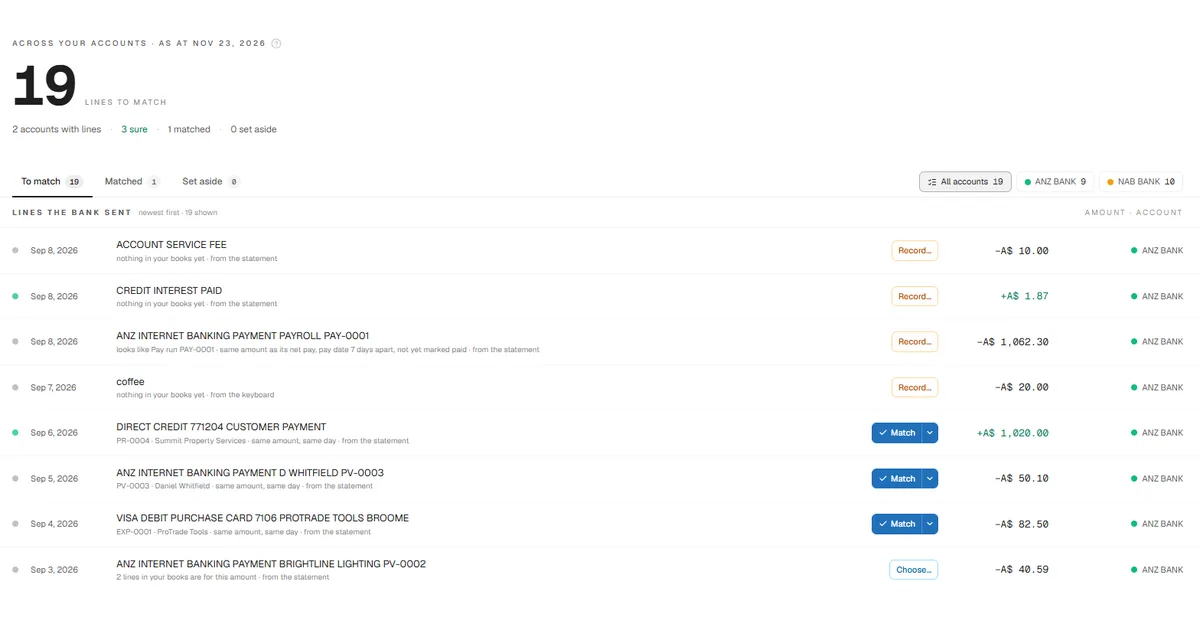
This is the order Papertools uses too. After you bring in your bank lines (by file, or a live bank connection for supported banks), the Match screen lists every line the bank sent and suggests what each one could be, with the reason in plain words: "same amount, same day", "2 lines in your books are for this amount", or "nothing in your books yet". Lines it's sure about can be confirmed together with Match all sure, but nothing is matched until you confirm it.
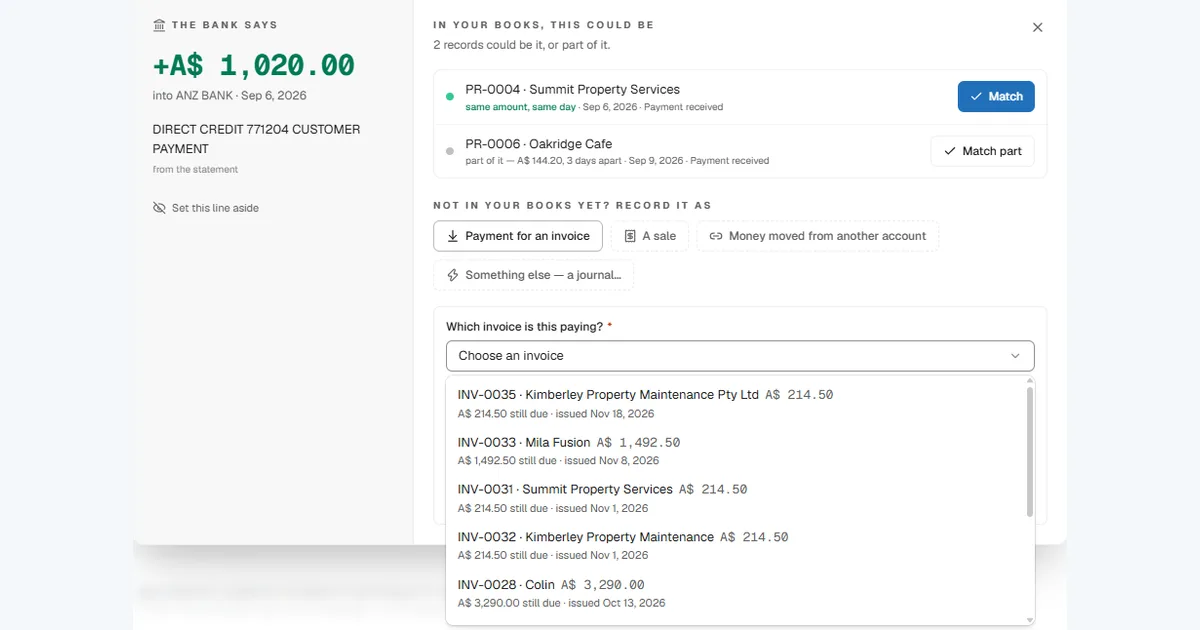
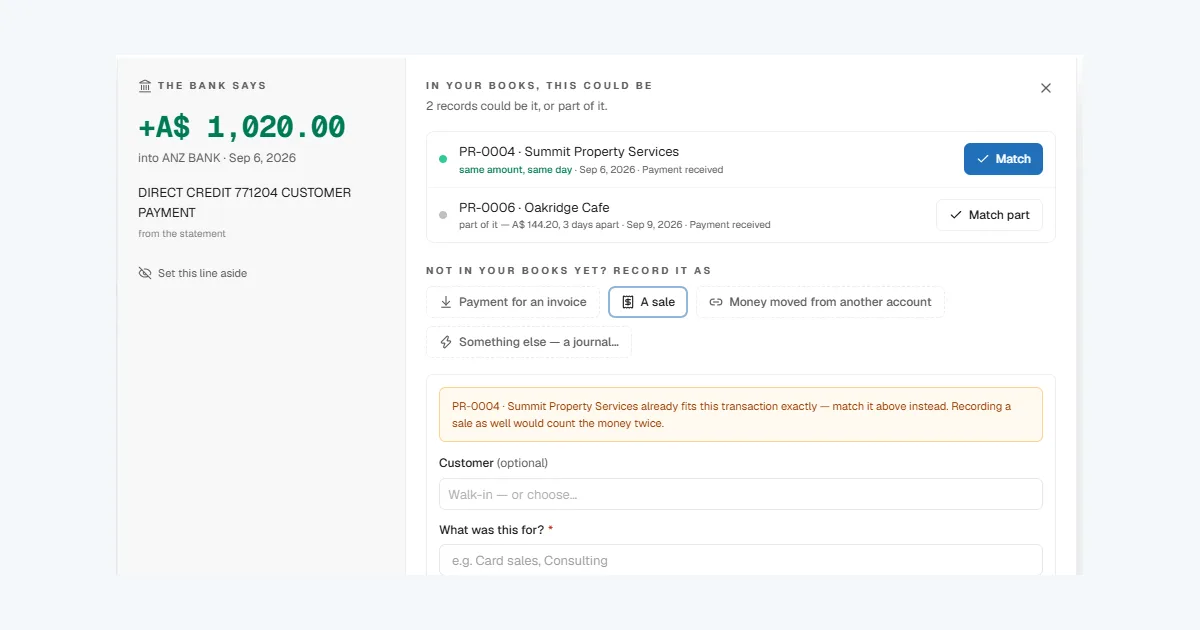
Open a line and Papertools shows the candidates side by side. Here the bank received $1,020.00 with no invoice number. One recorded payment is the same amount, same day, so it's offered as a full Match. Another covers only part of the money, so it's offered as Match part.
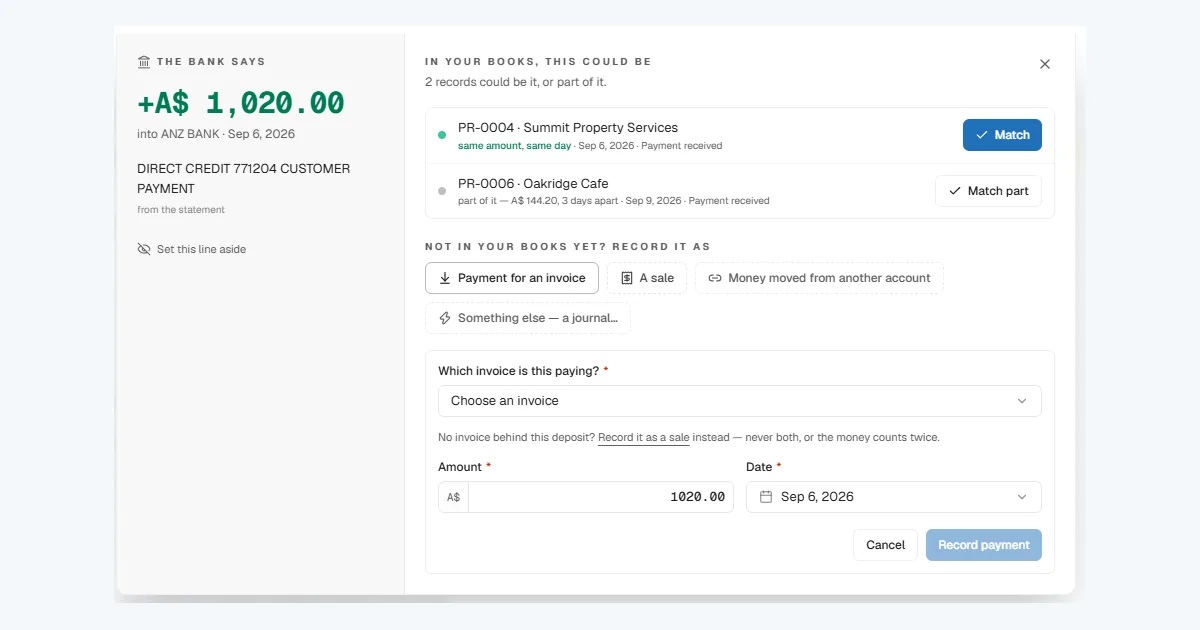
Haven't recorded the payment yet? Choose Payment for an invoice right there on the bank line. The list shows every open invoice with the amount still due and the date it was issued, so the one that matches the money is easy to spot, and the payment is recorded and matched in one step.
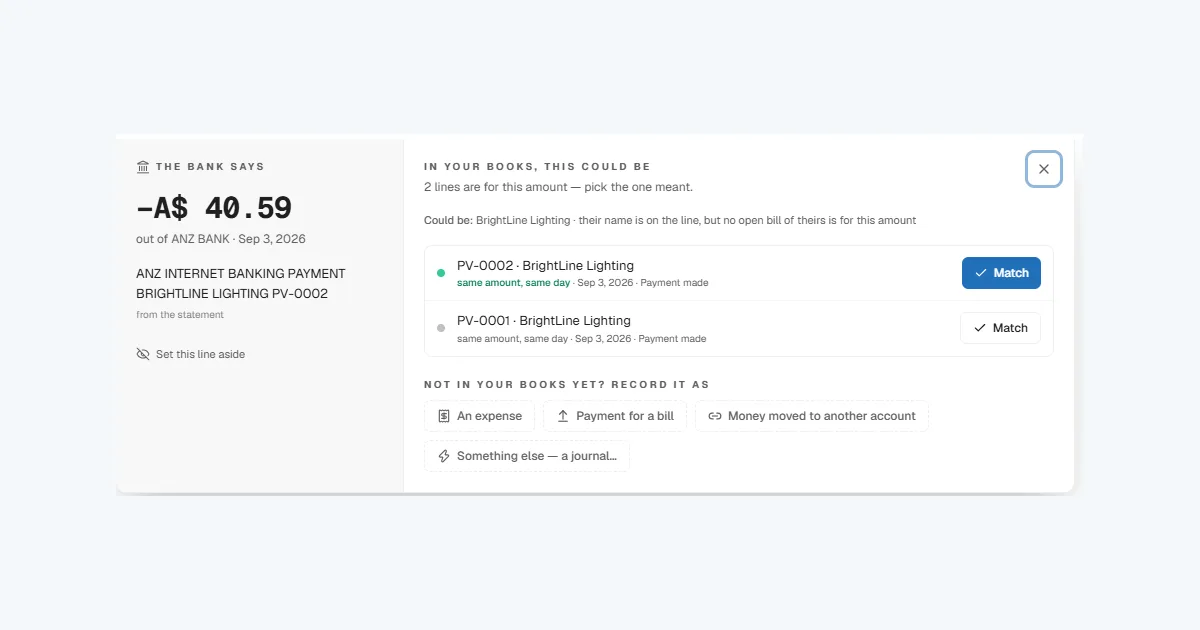
When two records share the same amount and date, Papertools doesn't pick one for you. It says so ("2 lines are for this amount, pick the one meant"), adds any hint it can find, such as a name that appears on the bank line, and leaves the choice to you. A wrong guess is worse than a question.
The hard cases
One payment, several invoices
A customer owes you three invoices and sends one transfer for the total. No single invoice matches the amount, so it looks like a mystery.
Record it as one payment and split it across the invoices it covers. In Papertools, open one of the invoices and choose Record payment. Enter the full amount, and the window lists the customer's other open invoices so you can say how much goes against each. Whatever isn't allocated stays on the invoice you opened. Add the customer's reference or remittance number in the Reference field so you can find it later.
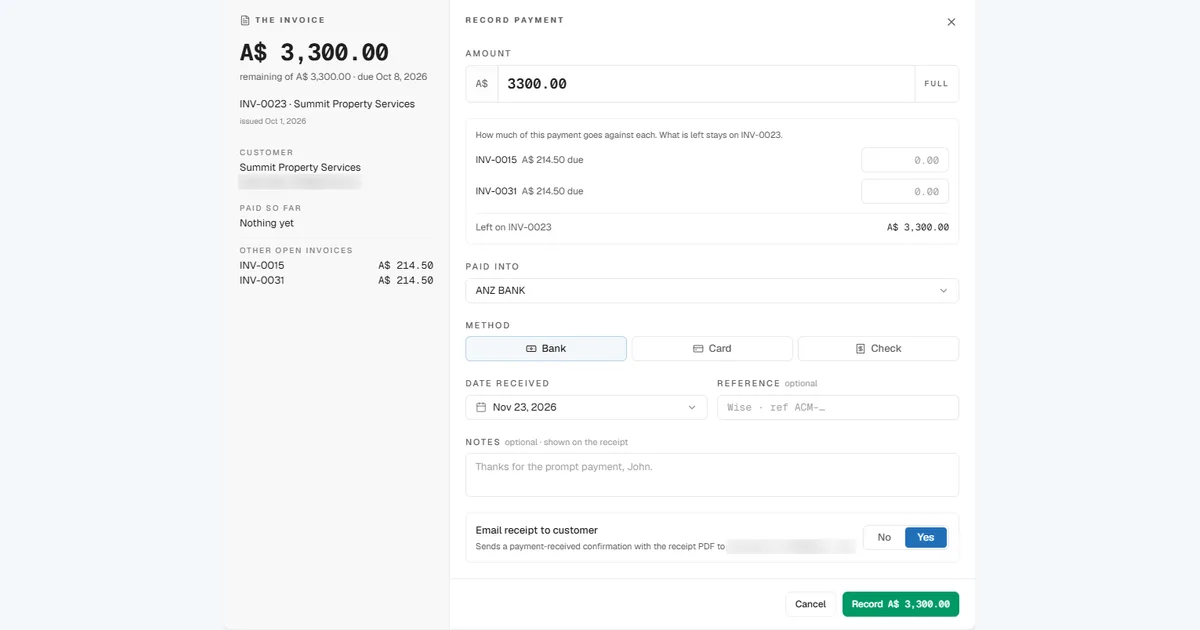
That one recorded payment now equals the single line on your bank statement, so it matches cleanly, and each invoice shows exactly what was paid against it. If you'd like the details, here's how to track partial payments across several invoices and projects.
Part payments
The amount is smaller than the invoice. That's usually a deposit, an instalment, or a customer who's disputing part of the bill. Record the amount that actually arrived against the invoice. The rest stays owing, and the invoice shows as partly paid with the balance still due.
If you're not sure why it's short, ask before you write anything off. A short payment is often a question about one line, not a refusal to pay.
Money that arrives before the invoice
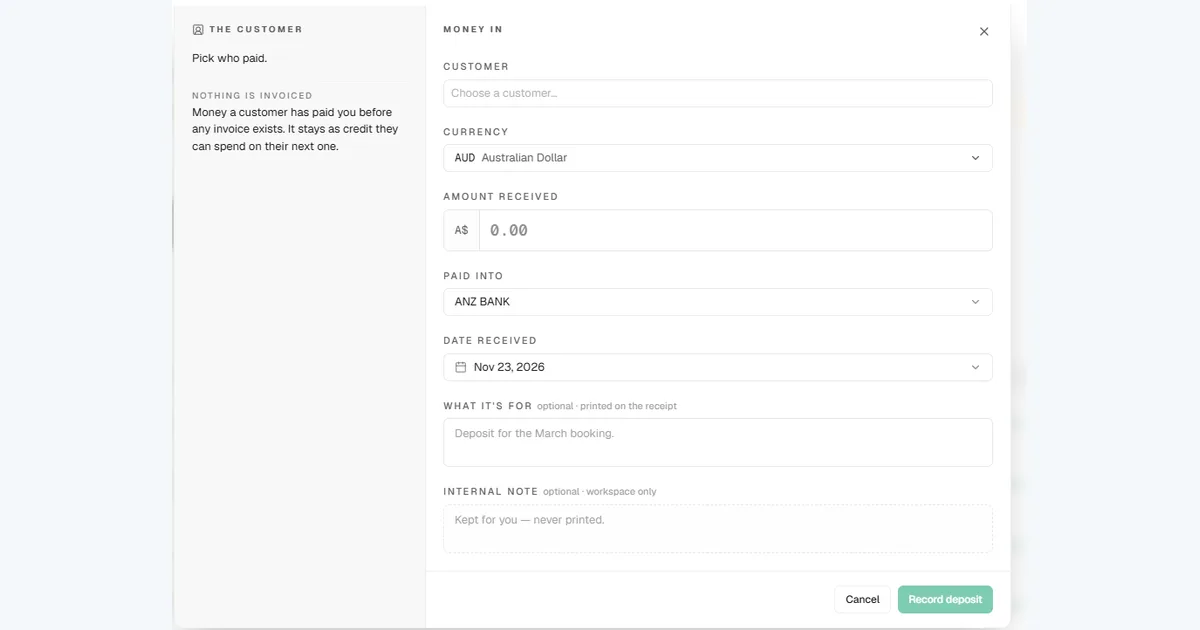
Sometimes a customer pays a deposit before you've invoiced anything. There's nothing to match yet, and recording it as a sale now means the income shows up twice once you invoice the job. Record it as a customer deposit instead: it sits as credit held for that customer, and you apply it when the invoice is ready.
In Papertools, choose New → Record a deposit from the credit notes list. Pick the customer, enter the amount, the account it was paid into and the date, and add what it's for (that line prints on their receipt). Once the deposit is recorded, it shows up on the Match screen like any other payment, so the bank line matches it in one tap (more on payments that arrive before the invoice).
Money that isn't a customer payment at all
Interest, a refund from a supplier, or money you moved from another account all land in the same list. In Papertools the same window offers the right record for each: a sale, money moved from another account, or a journal for anything unusual. Lines that need recording from scratch, like a bank fee, can become an expense right there.
Don't count the money twice
The most expensive mistake in matching isn't picking the wrong invoice. It's recording the same money twice: once as a payment on an invoice and again as a new sale from the bank line. Your income goes up, your tax figures go up, and the books no longer agree with the bank.
Papertools checks for this. If a recorded payment already fits the bank line exactly and you start recording it as something new, it stops you with a warning: the existing record already fits this transaction, match it instead, or the money counts twice.
When you genuinely can't tell
Some payments stay a mystery even after checking amount, date and name. Don't park them in a random invoice to make the list shorter.
- Set the line aside. In Papertools, Set this line aside moves it out of the to-do list into its own tab, so it isn't forgotten and doesn't block the rest.
- Check who owes that amount. An aging report shows every open invoice by customer. An amount that matches one customer's total, or the sum of two of their invoices, usually solves it.
- Ask the likely customer. Send their statement with a short note: "We received this payment on this date, could you confirm which invoices it covers?"
- Match it once they reply, and keep their answer in the payment's reference or notes.
A 10-minute weekly routine
Matching is quick when it's small. It's painful when it's three months deep.
- Once a week: bring in the latest bank lines, confirm the sure matches, sort the rest, set aside anything unclear.
- Same day: email the customer about anything you set aside, while the payment is fresh in their memory too.
- Before each tax return: make sure nothing is left in the to-do list for that period. Unmatched lines are money your figures don't explain.
If you're already months behind, start with how to catch up on bookkeeping without panicking, then switch to the weekly routine.
Frequently asked questions
How do I match a bank payment to an invoice without a reference? Compare the amount first, then the date, then the payer's name. An exact amount near an invoice's due date is usually the match. If two invoices fit equally, ask the customer rather than guessing.
What do I do when one payment covers several invoices? Record a single payment for the full amount and split it across the invoices it covers. The recorded payment then equals the one line on your bank statement and matches cleanly.
How should I record a part payment? Record the amount that actually arrived against the invoice. The rest stays owing and the invoice shows as partly paid.
What if a customer pays before I've sent an invoice? Record it as a customer deposit (credit held for that customer), match the bank line to that deposit, and apply it to the invoice when you raise it. Don't record it as a sale and invoice it as well, or the income counts twice.
What should I do with a payment I can't identify? Set it aside, check your aging report for a customer who owes that amount, and ask the likely customer to confirm. Don't attach it to a random invoice.
How do I get customers to include a reference? Ask for it in the payment details on every invoice ("Please use the invoice number as your payment reference"), keep invoice numbers short, and ask business customers to send a remittance advice when they pay several invoices together.
Where to go next
- How to track partial payments across multiple projects — when one customer pays in pieces across several invoices
- A client paid before the invoice was ready — recording deposits so the money doesn't count twice
- How to read an aging report — finding who owes the amount that just arrived
- Behind on bookkeeping? How to catch up without panicking — clearing a backlog of unmatched bank lines
This article is general information about how bookkeeping works, not tax, accounting or legal advice. Rules differ by country and business. Check with a qualified adviser before acting on anything here. Papertools gives you the figures; the decisions stay with you.